Training Dataset
Training Dataset Registry is a centralized library for training datasets used across Protean AI. It enables you to register, version, validate, and govern datasets that are used for fine-tuning, evaluation, and experimentation.
Just like models, datasets are first-class resources in Protean AI. The registry ensures datasets are reusable, versioned, auditable, and safely integrated with fine-tuning workflows.
Training Dataset Registry provides the following advantages:
- All training datasets are available in a single, governed location
- Consistent registration and versioning pattern across all datasets
- Built-in integration with fine-tuning, evaluation, and data-lineage
- Full reproducibility by locking training jobs to immutable dataset revisions
- Traceability of dataset usage across fine-tuning runs
- Enterprise-grade access control and auditability
Dataset Configuration
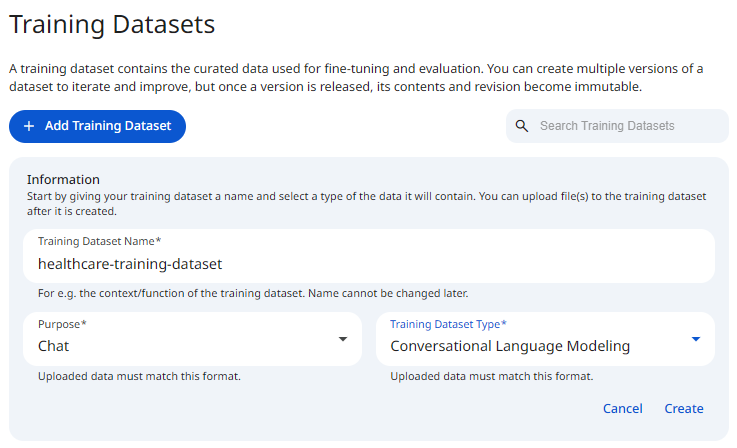
To register a training dataset, you define the dataset's registration characteristics. This includes the following, along with additional metadata:
- A dataset name to identify the dataset
- The purpose of fine-tuning, the dataset is designed for
- The training dataset type, which defines the expected schema and format
See the screenshot below for an example of Training Dataset Configuration.
 Snapshot of Protean AI Platform
Name
The dataset name is a unique identifier for the training dataset. It is used to identify the dataset in the registry and during fine-tuning configuration, and it may contain alphanumeric characters. The name must be unique across all training datasets in the registry, which is what lets you reliably select the right dataset when configuring a training job and keeps dataset references unambiguous across the platform.
Purpose
Purpose defines the type of task the dataset is designed to support.
It must align with the purpose of the model being fine-tuned.
| Purpose | Use Case |
|---|---|
| Chat | Conversational agents, assistants, tool calling, reasoning |
| Text Generation | Code completion, structured text generation |
| Embedding | Embedding training for similarity search and RAG |
| Reranking | Search result reranking, relevance scoring |
Defining the purpose ensures that the dataset is used with compatible models.
Type
The Training Dataset Type defines:
- The required schema
- The loss function to use during training
Using an incorrect dataset type can silently degrade training quality or produce invalid results, hence Prtean AI is opinionated and strictly enforces a dataset format.
Revisions
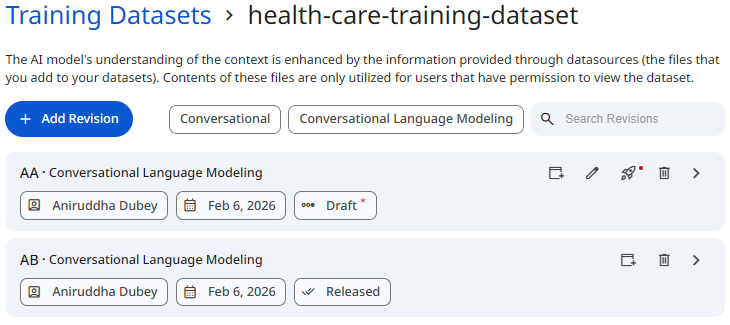
Training datasets are versioned using revisions.
A revision represents an immutable snapshot of the dataset at a specific point in time. Revisions ensure:
- Full reproducibility of training runs
- Safe evolution of datasets over time
- Clear auditability of which data trained which model
Add
Adding a revision uploads a dataset file and creates a new dataset version.
When revisions are created, they are in a draft state. In draft status, revisions can be modified (new records appended, old records overridden).
Behavior:
- Only one upload can occur at a time
- Uploaded files are validated against the dataset type
- Revisions become visible immediately after upload
Once a revision is released, it becomes immutable and cannot be modified. Only release revisions can be used in fine-tuning jobs.
Append
Append creates a new revision by adding new records on top of an existing revision while preserving the records already present. You use append when the dataset is being incrementally grown and newly collected samples need to be added to what is already there. This matters because it lets a dataset evolve over time without discarding earlier data, and because each append produces a fresh revision, the previous state remains intact and reproducible.
Overwrite
Overwrite creates a new revision whose contents fully replace the data in the existing revision rather than adding to it. You use overwrite when the existing data is no longer valid and the dataset needs to be rebuilt from scratch. This matters because it gives you a clean way to correct or supersede bad data, while still capturing the change as a distinct revision so the earlier version stays auditable.
Release
Only released revisions can be used in fine-tuning jobs.
Releasing a revision indicates:
- The dataset has been validated
- Schema and content are correct
- The revision is safe for training
Best practice: treat released revisions as training-grade artifacts.
Delete
Delete removes a dataset revision from the registry. You use it with care, removing only invalid or mistakenly uploaded revisions, because the operation discards that snapshot of the data. This matters for keeping the registry clean while protecting training history, which is why a revision cannot be deleted once it is referenced by an active or completed fine-tuning job.
Dataset revisions cannot be deleted if they are referenced by an active or completed fine-tuning job.
See the screenshot below for an example of Training Dataset Revisions.
 Snapshot of Protean AI Platform
Dataset Usage
Before a dataset can be used for fine-tuning:
- The dataset must be registered
- At least one revision must be uploaded
- A revision must be released
During fine-tuning configuration:
- Training Dataset selects the dataset
- Revision locks the exact dataset version
This guarantees:
- Training reproducibility
- Experiment traceability
- Safe reuse across multiple runs
Access Control
Access Control governs who can view, modify, and use training datasets.
Protean AI follows the principle of least privilege to ensure enterprise-grade security and governance.
Role→ Action↓ | Admin | ModelAdmin | Owner | Viewer | User | Description |
|---|---|---|---|---|---|---|
| Create | Yes | Yes | NA | NA | Yes | Register a traning dataset |
| Read | Yes | No | Yes | Yes | No | View traning dataset and revisions |
| Update | YES | No | Yes | No | No | Modify traning dataset metadata and revisions |
| Delete | YES | No | Yes | No | No | Remove traning dataset and revisions |
| Manage Access | Yes | No | Yes | No | No | Grant or revoke permissions |
| Release | Yes | No | Yes | No | No | Release traning dataset. |
:::info Dataset Deletion
- Deleting a dataset removes all associated revisions
- A dataset cannot be deleted if it is referenced by an active or completed fine-tuning job
:::
Workflow
- Define dataset name, purpose, and dataset type
- Upload initial dataset revision
- Validate dataset structure and samples
- Release revision
- Use released revision in fine-tuning
Result
After registration, the training dataset becomes available for authorized users and can be safely reused across fine-tuning workflows with full versioning, governance, and traceability.