Configuration
This guide details the configurable settings ("knobs and dials") available when fine-tuning a Large Language Model (LLM) using Protean AI. Fine-tuning is analogous to training a new employee: decisions must be made regarding the volume of learning, the pace of instruction, and the specific skills to prioritize.
Simple and Advanced Modes
The finetune configuration form opens in two modes, and a toggle in the top right corner switches between them. Simple mode is the default and shows only the essential fields, with an Advanced link to reveal the full configuration. Advanced mode lays the same configuration out as a four step wizard (Model, Dataset, Learning & Adaptation, Evaluate & Checkpoint) and offers a Simple link to collapse back. You choose a mode based on how much control you need: Simple is the fast path when you trust sensible defaults, while Advanced is for when you want to hand tune the learning process.
Simple Mode
In Simple mode you supply only the model identity, the compute node, and the dataset, and Protean AI derives everything else for you. The hyperparameters, the training and evaluation data split, and the evaluation strategy are automatically optimized based on the selected Purpose, so a Chat finetune and an Embedding finetune each receive defaults suited to that task. This matters because it removes the need to understand learning rates, ranks, and warmup factors before running a first finetune: you fill in a handful of fields and start, then move to Advanced mode later if the results call for tuning.
Simple mode collects:
- Model & Infrastructure Setup: Name, Purpose, Model, and Node Pool.
- Dataset Configuration: Training Dataset, Revision, and Batch Size.
Every one of these fields is described in the sections below, where they also appear in Advanced mode.
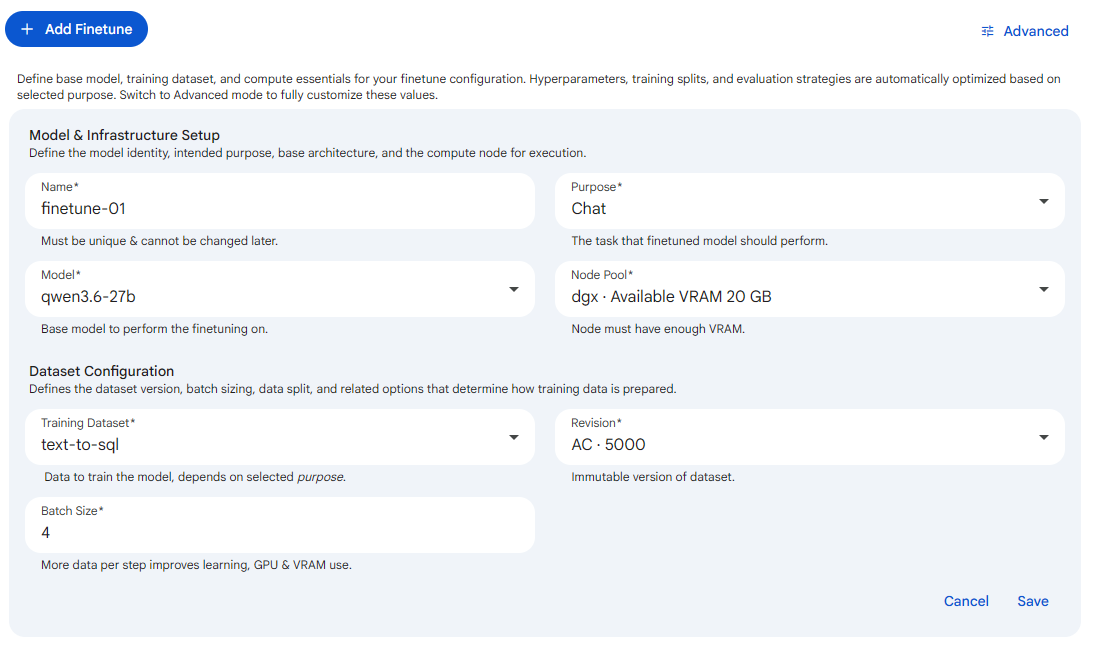 Snapshot of Protean AI Platform
Advanced Mode
Advanced mode exposes the complete set of knobs as a four step wizard, where each step groups related settings: Model holds the model identity, infrastructure, and the core training dynamics; Dataset holds the training data and how it is prepared; Learning & Adaptation holds the hyperparameters that shape how the model learns; and Evaluate & Checkpoint holds the evaluation cadence and recovery snapshots. You move through the steps with the stepper at the top, and you switch back to Simple mode at any point with the Simple link. Use Advanced mode when the automatic defaults are not producing the quality you need and you want to set values such as epochs, learning rate, rank, and evaluation frequency yourself.
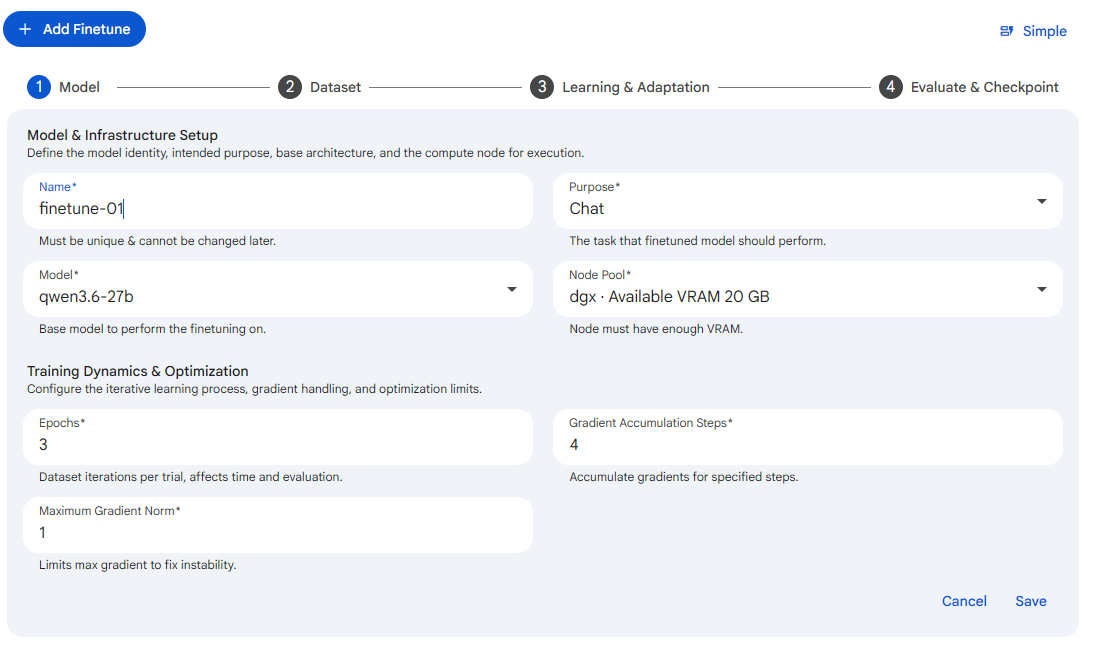 Snapshot of Protean AI Platform
The remaining sections of this page document every field available in Advanced mode, grouped the same way the wizard groups them.
General Settings
These settings control the behavior of the fine-tuning process.
See the screenshot below for an example of Finetune General configuration.
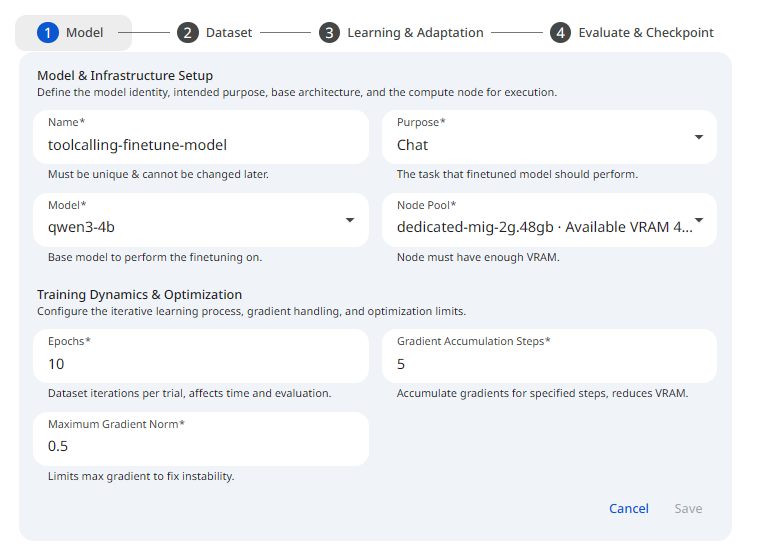 Snapshot of Protean AI Platform
Name
The model name is a unique identifier for the model. It is used to identify the model in the registry. It must be unique across all models in the registry. It can contain alphanumeric characters.
Purpose
The purpose of the model is a description of the task it is intended to perform. The following table summarizes the purposes that Protean AI supports.
| Purpose | Use Case |
|---|---|
| Chat | Conversational Agent, Tool Calling, Thinking |
| Text Generation | Code Completion, Sentence Completion (Used in email clients or writing tools) |
| Embedding | Similarity Search, RAG embeddings |
| Reranking | Search result reranking, retrieval refinement, relevance scoring, RAG ranking |
Model
The model field specifies the model to be fine-tuned. Only registered models can be fine-tuned. See Model Registry for information on how to register a model. See Model Selection for more information on how to select a model for fine-tuning.
Epochs
An epoch is one complete pass through the entire training dataset, allowing the model to see and learn from every single data sample once, updating its internal parameters based on the errors. Think of it like reading a textbook once for studying; one epoch means reading the whole book, while multiple epochs are like reading it several times to master the material. The number of epochs specifies the number of times the model will cycle through the entire dataset.
Multiple epochs are usually needed for the model to iteratively improve; however, too many can lead to overfitting. See Balancing Performance for more information. For large datasets, 1 to 3 epochs are usually enough. Monitor validation loss to stop training before the model begins to overfit (memorize) the data.
Gradients Accumulation Steps
Gradients accumulation is a method to simulate a larger batch size without increasing memory usage. See Gradient Accumulation for more information. The number of gradient accumulation steps specifies the number of mini-batches to accumulate before performing a parameter update. For example,
- If
Batch Sizeis 2 andGradient Accumulationis 8, the model processes 16 examples at a time. - If
Batch Sizeis 4 andGradient Accumulationis 4, the model processes 8 examples at a time.
Max Gradient Norm
The maximum gradient norm is a threshold limit for training updates. A technique called "Gradient Clipping" that caps the maximum value of gradients to a specific threshold. Usually set to 1.0. This acts as a safety valve to prevent "exploding gradients," ensuring that a single "bad" data point doesn't corrupt the entire model during an update. See Gradient Clipping for more information.
Node Pool
The node pool field specifies the compute resources to be used for training. The fine-tuning job runs on the node pool you select here, so it determines the GPU and memory available to the run and therefore which model sizes and batch sizes are feasible. Choosing an appropriately provisioned node pool matters because an undersized pool can cause out-of-memory failures, while training simply cannot start until a pool is assigned. See Node Pools for more information.
Dataset Settings
These settings control the training data, evaluation data etc.
See the screenshot below for an example of Finetune Dataset configuration.
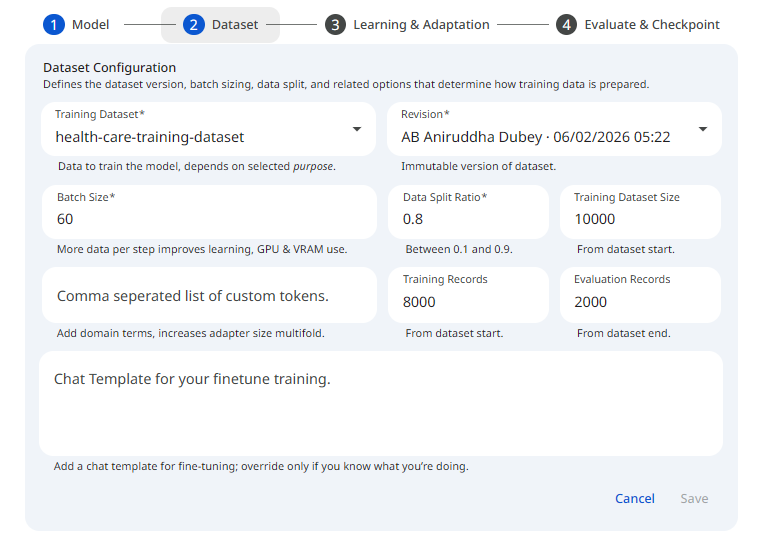 Snapshot of Protean AI Platform
Training Dataset
The training dataset is the data used to train the model. 1000 examples or more are recommended. Dataset format is very important for fine-tuning. Using wrong format can lead to incorrect results. See the Dataset for information on the schema and structure of the data and dataset.
Training data must be registered in the dataset registry before it can be used for fine-tuning. See the Training Datasets, on how to register a traning dataset and make it available for fine-tuning.
Revision
The revision field specifies the revision of the training dataset to be used for fine-tuning. A training dataset can have multiple revisions, and this field pins the run to one specific version of the data. Pinning a revision matters because it makes a fine-tune reproducible: the same revision always trains on the same examples, so a run can be repeated or compared without the underlying data shifting beneath it. See Dataset Revisions for more information.
Batch Size
The batch_size parameter defines how many training samples, from the training dataset, are processed together in a single forward and backward pass. It is used alongside Gradient Accumulation to set the effective number of examples seen before each parameter update, so a batch size of 4 with 4 accumulation steps processes 8 examples at a time. Batch size matters because larger values make better use of the GPU and can stabilize training, but they also consume more memory, so it is typically raised until GPU usage is near saturation without exceeding available VRAM.
Data Split Ratio
The data_split_ratio parameter defines the ratio of training data to evaluation data.
The data split ratio is used to split the training dataset into training and evaluation datasets.
The training data is used to train the model. The evaluation data is used to monitor the model's performance during training.
The default split ratio is around 0.9 (per purpose), meaning roughly 90% of the data is used for training and 10% for evaluation. It must be greater than 0 and less than 1.
Example: data_split_ratio = 0.9 means that the first 90% of the training dataset is used for training, and the last 10% is used for evaluation.
Custom Tokens
The custom_tokens parameter defines the list of custom tokens to be added to the tokenizer vocabulary.
Without custom tokens, a model sees a specialized word (like a product ID PX-900 or a specific code function get_auth_token) as a series of fragments: P, X, -, 9, 0, 0.
Impact: By adding it as a custom token, it becomes one single unit. This reduces the total sequence length, allowing you to fit more information into the same context window and speeding up processing.
This is the "under the hood" impact you need to be careful with: Embedding Matrix Expansion: Every time you add a custom token, the model's Embedding Layer and Language Modeling Head (the input and output layers) grow. Protean AI resize the model's token embeddings automatically to accommodate the new vocabulary size. However, this results in increased size of the model adapters as it now has to store 2 additional layers(embeddings and head).
Chat Template
This parameter is only applicable for instruction tuned models, used for chat objective.
A chat template is a Jinja template stored in the tokenizer's chat_template attribute.
It is strongly recommended to use the default chat template. This is done by leaving the chat template parameter empty.
In some cases, where the default chat template does not work, due to a defect etc., you can use a custom chat template.
Thinking (chain-of-thaught), or tool-calling capabilities can be added to an instruction tuned model that does not have those capabilities.
This can be done by adding special tokens to the tokenizer vocabulary using the custom_tokens parameter.
And then using the special tokens in the chat template. In order for this to work, the model must be fine-tuned on a dataset that contains the special tokens.
The dataset size also must be large enough (usually 10s of thousands of high quality data) to allow the model to retain the special tokens.
Hyperparameter Settings
Hyperparameters are external configurations that dictate how the model learns. Choosing the right ones is often called "Hyperparameter Tuning".
See the screenshot below for an example of Finetune Hyperparameter configuration.
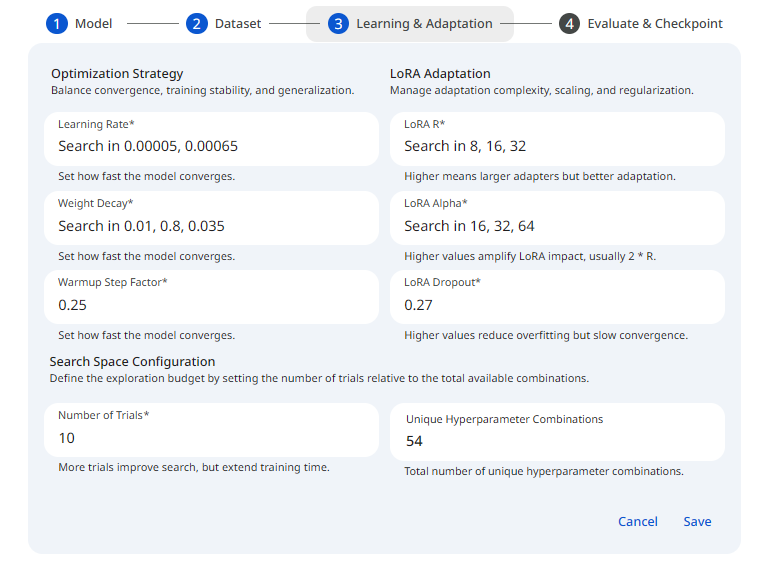 Snapshot of Protean AI Platform
Learning Rate
This is arguably the most important hyperparameter. It determines the "size" of the optimizer's movement when updating model weights. The learning rate is used as a multiplier, it is specifically multiplied by the gradient (or slope) of the loss function. In gradient descent, this product is then used to determine the magnitude of the update applied to the weight.
Too High Value: The model processes material too quickly, missing details or causing training failures.
Too Low Value: Learning progresses too slowly, potentially failing to converge within a reasonable time.
- Recommendation: 2e-4 (0.0002) is the standard starting point for QLoRA/LoRA fine-tuning.
Warmup Step Factor
A warmup step factor defines the initial training phase where the learning rate increases gradually from a very low value to the target, maximum learning rate. It stabilizes training by preventing premature divergence caused by high gradients, allowing model weights to adjust to new data. This is a fraction between 0 and 1 (inclusive), not a step count. The slider moves in increments of 0.05.
- Recommendation: A factor of 0.05 (5%) or 0.1 (10%) provides a smooth start.
Weight Decay
Weight decay is a regularization technique that keeps model parameters small to prevent overfitting.
Protean AI uses AdamW optimizer, which incorporates weight decay into the optimizer's update rule.
It gently penalizes large weights by shrinking them by weight_decay at every training step, independent of the gradient updates.
The effective decay applied at each step is actually learning_rate * weight_decay.
- Recommendation: 0.01 is the standard default and rarely requires adjustment.
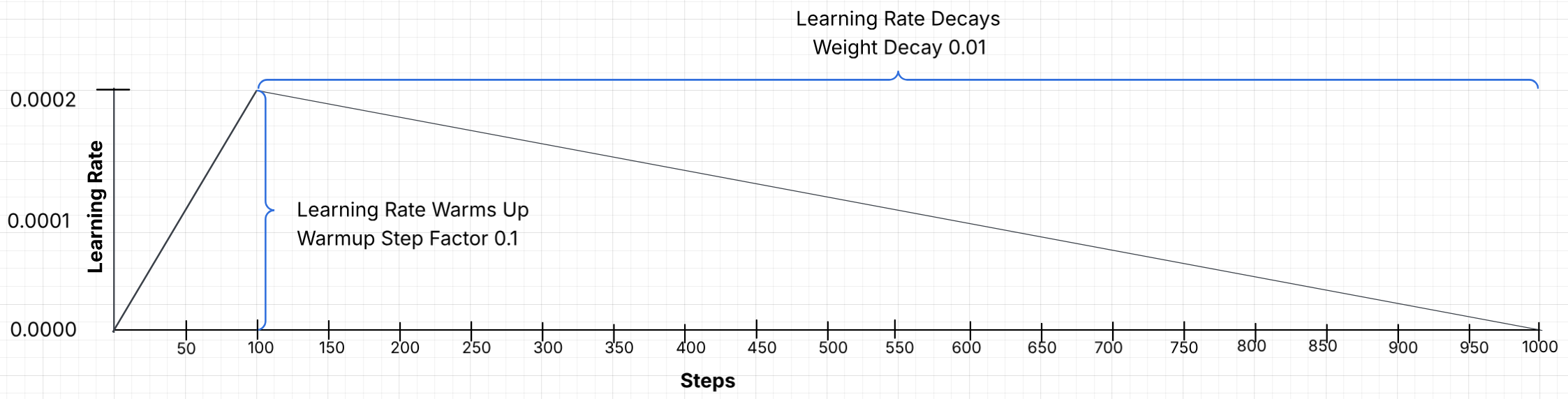 Snapshot of Protean AI Platform
Rank (r)
This is the rank of the low rank adaptation matrices and directly controls how many new trainable parameters you add. The configurable range is 4 to 512 (slider increments of 2).
Lower r (e.g. 4 to 8): fewer adapter parameters, lower VRAM and faster, but less expressive updates; good for simple tasks or light domain shifts.
Medium r (e.g. 16 to 32): common "sweet spot" for instruction tuning and many LLM fine tunes.
High r (e.g. 64 to 256): more memory and compute, necessary if the model is being taught a massive amount of new information (such as a new language or a complex technical domain), but increases overfitting risk and diminishing returns.
- Recommendation: Start with 16. If the model fails to retain enough information, increase to 32 or 64.
Alpha
Alpha is the scaling factor that controls how strongly the LoRA update influences the base model's weights. The configurable range is 4 to 1024.
Lower alpha makes the LoRA update more conservative.
Higher alpha makes the LoRA update more influential.
- Recommendation: A general rule is Alpha = 2 × Rank.
- If Rank is 16, set Alpha to 32.
- If Rank is 64, set Alpha to 128.
Dropout
LoRA fine-tuning, while efficient, can still overfit to small, specialized training datasets. Dropout acts as a regularizer, forcing the model to learn more robust patterns rather than memorizing the training data. Dropout is a regularization technique that randomly discards some of the model's neurons during training to prevent overfitting. When setting lora_dropout (e.g., 0.1), 10% of the neurons in the low-rank adapters are randomly set to zero during each forward and backward pass. The value is a fraction between 0 and 1 (inclusive), and the default is 0.01.
- Recommendation: Start low, only increase if overfitting is observed. If underfitting, decrease it.
- 7B to 13B Parameters: 10% (0.1) is commonly recommended,
- 33B to 65B+ Parameters: 5% (0.05) is recommended.
Evaluation & Snapshot Settings
These settings control the evaluation and snapshot process. They are used to monitor the model's performance during training and create snapshots for recovery purposes. Evaluation results can be used to determine when to stop training. Snapshots are used to recover from a crashed training session.
See the screenshot below for an example of Finetune Evaluation configuration.
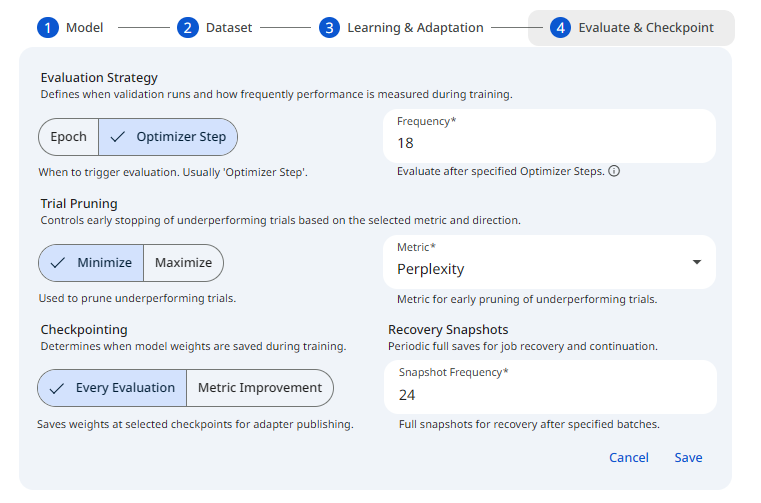 Snapshot of Protean AI Platform
Evaluation Level
Determines the unit of measurement for triggering an evaluation. Options include Epoch (one full pass through the dataset) or Optimizer Step (after a specific number of optimizer steps). If the number of epochs is 1-3, it is recommended to use Optimizer Step, because doing it at epoch level will not give enough insights on how training is performing.
- Recommendation: Optimizer Step is recommended. **
Evaluation Frequency
The numeric interval at which evaluation should occur, based on the selected Level. For example, setting this to 1, evaluates after every single epoch or optimizer step. It is not recommended to evaluate every optimizer step as it can slow down training. Typically, evaluation should occur every 10% - 20% of the training steps in an epoch. This will give enough time to monitor the model's performance and stop training if needed.
- Recommendation: 20% of the training steps in an epoch.
Evaluation Metric
The metric that is used to evaluate the model's performance. It is the quantity computed on the evaluation split each time an evaluation runs, such as Validation Loss, Accuracy, or F1-score, and it is the signal the system tracks to judge whether training is improving. This choice matters because it defines what "better" means for the run: the selected metric drives checkpointing on improvement and the pruning of trials that are not making progress, so picking a metric aligned with the task keeps training focused on the outcome you actually care about.
- Recommendation: Validation Loss **
Evaluation Metric Direction
The direction defines the goal for the chosen evaluation metric, that is, whether a lower or a higher value counts as an improvement. Use Minimize for metrics like Loss and Maximize for metrics like Accuracy or F1-score. This setting matters because it tells the system which way the metric should move: it is the logic behind pruning trials that are not improving and behind taking a checkpoint only when the metric genuinely gets better, so it must match the metric you selected above.
- Recommendation: Minimize (in conjunction with Validation Loss) **
Checkpointing
Checkpointing controls when weights are saved at evaluation time for adapter publishing. This setting defines the moments when a checkpoint should be made. Possible values are:
- Every Evaluation: Every evaluation is eligible for a checkpoint.
- Metric Improvement: A checkpoint is taken every time the evaluation metric improves.
Snapshot Frequency
Snapshot Frequency (the "Recovery Snapshots" control) is a separate numeric field that determines how often full training snapshots (states) are saved for recovery purposes. It is the number of optimizer steps between snapshots (minimum 1). Increasing this value can reduce overhead if evaluations are happening very frequently.
Quick "Copy-Paste" Cheat Sheet
The following values serve as a reliable starting point for chat objective on instruction tuned models.
| Parameter | Default | Adjustment Criteria |
|---|---|---|
| Rank (r) | 16 | Range 4 to 512. Increase if the task is highly complex. |
| LoRA Alpha | 32 | Range 4 to 1024. Maintain at 2 * Rank. |
| Learning Rate | 5e-4 (0.0005) | Range (0, 1]. Lower if the training graph is unstable. |
| Epochs | 3 | Minimum 1. Adjust based on dataset size and overfitting. |
| Batch Size | 4 | Minimum 1. Increase until 90% GPU usage is reached. |
| Weight Decay | 0.01 | Range 0 to 1. Usually requires no change. |
| Warmup Step Factor | 0.1 | Range 0 to 1 (step 0.05). Smooths training initiation. |
| LoRA Dropout | 0.01 | Range 0 to 1. Increase only if overfitting is observed. |
| Max Gradient Norm | 1 | Range (0, 1]. Caps gradients to prevent instability. |