Adapter
Adapter Registry is a centralized library for fine-tuned adapters in Protean AI. Adapters represent the learned data on top of a base model, capturing task-specific knowledge, behavior, and optimization without duplicating the full model weights.
Adapters are first-class, deployable artifacts in Protean AI. The registry enables teams to manage fine-tuning projects, track lineage, compare runs, and safely publish the best adapter.
Adapter Registry provides the following advantages:
- Centralized catalog of all fine-tuned adapters
- Clear separation between base models and learned behavior
- Full lineage tracking across datasets, configurations, and runs
- Immutable release and deployment of adapters
- Built-in access control and enterprise governance
Adapter Configuration
The create form is the external import flow: it registers an adapter by uploading the adapter weights along with their identity and metadata. An adapter is always associated with a base model and represents the outcome of one or more fine-tuning runs.
See the screenshot below for an example of adapter configuration.
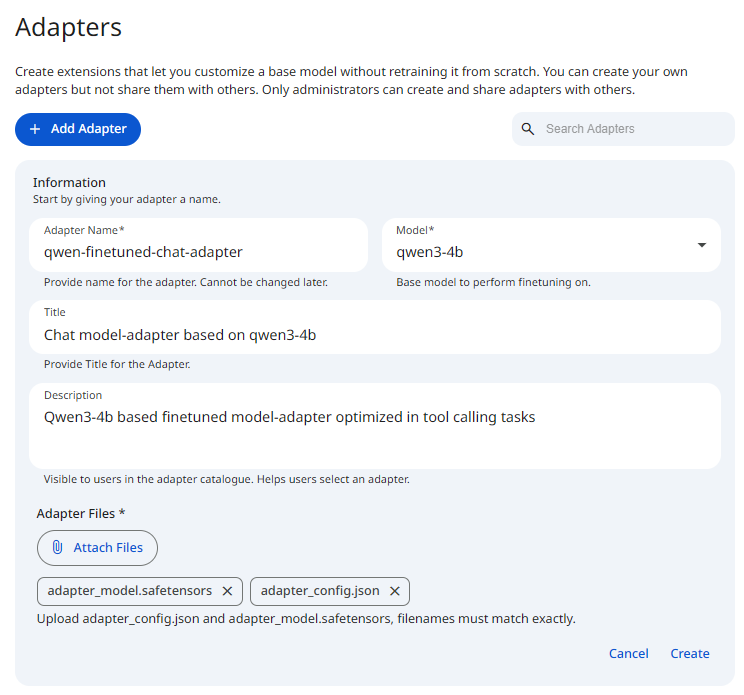 Snapshot of Protean AI Platform
Adapter Name
The "Adapter Name" is a unique identifier. It is used to reference the adapter during deployment. The name is required and must be between 3 and 40 characters. It may contain only alphanumeric characters and hyphens, and any spaces you type are automatically converted to hyphens. The name is immutable: it cannot be changed after creation.
Model
The Model field specifies the base model on which the adapter was trained. Only models marked as deployable can be selected, and the adapter can be deployed exclusively together with this base model. For the adapters published from fine-tuning runs, the model is automatically inferred from the fine-tuning configuration. This explicit linkage guarantees compatibility between the adapter weights and the underlying model architecture. The model is fixed after creation: an update can only change the name, title, and description.
Title
The title provides a short, human-readable identifier for the adapter. It is intended for quick recognition in catalog views and comparison workflows. The title is optional and may be up to 50 characters.
Description
The description provides a detailed explanation of the adapter's behavior and intended use. It should clearly state what the adapter was trained to do, describe the nature of the training data, outline the intended deployment scenarios, and highlight any known limitations or constraints. A clear description helps teams select the correct adapter and avoid misuse. The description is optional and may be up to 250 characters.
Adapter Files
The "Adapter Files" upload is required.
You must provide the adapter weights, including adapter_config.json and adapter_model.safetensors, and the filenames must match exactly.
The Create button stays disabled until at least one file is selected.
Conversion
After you submit the form, Protean AI converts the uploaded adapter so it can be registered. While conversion runs, the form shows "Converting... Do not reload or refresh", so keep the page open until it finishes. Conversion moves through the statuses STARTED, SUCCEEDED, FAILED, and ABORTED. On success you are taken to the new adapter, and on failure an error message explains what went wrong.
Lineage
Adapters in Protean AI maintain full lineage, on adapters that were produced by fine-tuning runs.
A lineage represents the complete evolution path of an adapter, including:
- Fine-tuning configuration
- Training dataset
- Dataset revision
- Training run and evaluation
Lineage is immutable and automatically maintained by the platform.
External vs Internal Adapters
Adapters can originate from two sources:
Internal Adapters
Internal adapters are produced by fine-tuning runs executed inside Protean AI. They are fully tracked with complete lineage, metrics, and dataset information, and are published directly from the evaluation steps of fine-tuning runs.
External Adapters
External adapters are imported via file upload using the HuggingFace LoRA format and are explicitly marked as external. This provides a way to deploy adapters that were not produced within Protean AI while keeping them manageable through the same registry.
Deployment
Adapters are first-class, deployable artifacts. An adapter can only be deployed by attaching it to its corresponding base model, and together they form a runnable inference unit. See Model Deployment Once deployed, the adapter follows the same runtime behavior, access controls, and operational rules as standard model deployments.
Only authorized users are permitted to deploy models and include adapters as part of a deployment.
Access Control
Access Control in Protean AI governs who can view, create, modify, and operate resources across the platform. It is designed for enterprise environments where security, isolation, and governance are mandatory.
Protean AI follows a principle of least privilege, ensuring users and systems are granted only the permissions required to perform their tasks.
| Role→ Action↓ | Admin | Model Admin | User | Owner | Viewer | Description |
|---|---|---|---|---|---|---|
| Create | Yes | Yes | Yes | NA | NA | Register or import adapters |
| Read | Yes | Yes | No | Yes | Yes | Read adapter metadata & deploy adapter for inferencing |
| Update | Yes | Yes | No | Yes | No | Edit adapter metadata |
| Delete | Yes | Yes | No | Yes | No | Deregister the adapter and remove it from the system |
| Manage Access | Yes | Yes | No | Yes | No | Grant or revoke permissions for users and groups. |
:::info Adapter Deletion
- Deleting an adapter from the registry also deletes all the artifacts from the storage.
- Adapter can only be deleted if it is not currently deployed.
:::
Workflow
- Select a base model from the Model Registry
- Run fine-tuning to produce an adapter, and publish an adapter from an evaluation or import an external adapter
- Deploy the adapter when ready
Result
Adapters are the bridge between raw models and production-ready intelligence. After registration, adapters become reusable, governed, and deployable assets.