Model Deployment
Model Deployment is the execution layer of Protean AI. It converts registered models into production ready inference services by managing deployment, resource allocation, configuration, and lifecycle control. It abstracts infrastructure complexity while providing fine-grained control over performance, memory usage, startup behavior, and safe, predictable placement on suitable nodes.
Model Deployment provides the following advantages:
- Clear separation between model preparation and model execution
- Automatic VRAM estimation based on deployment configuration
- Intelligent node selection based on resource availability
- Consistent deployment workflow across different model types
- Full lifecycle control without manual infrastructure management
Deployment Configuration
To create a model deployment, you define the deployment characteristics of your model runtime. This includes:
- A name to identify the deployment
- A registered model that you want to deploy, from Model Registry
- The quantized variant of the model to deploy
- The context size used during inference
- The number of parallel processes for concurrent execution
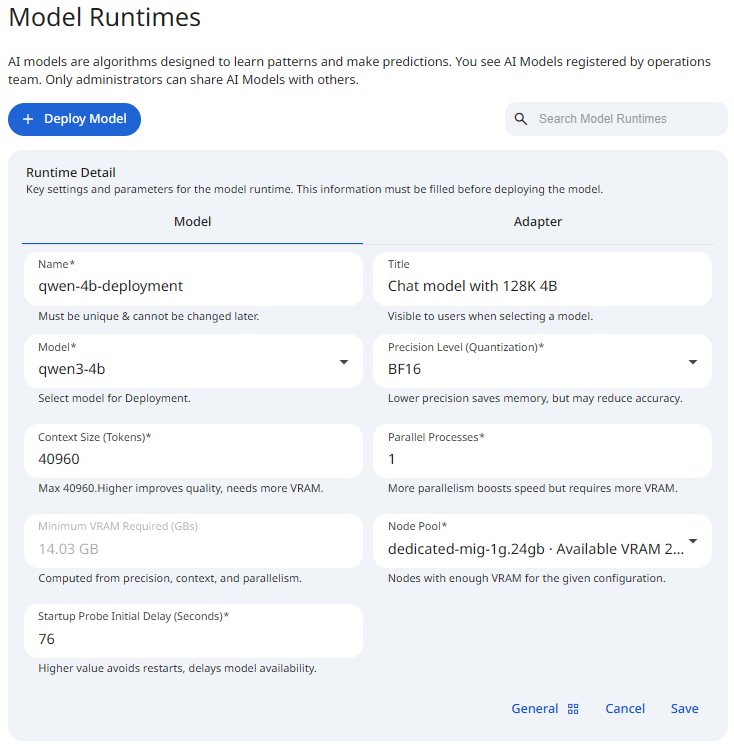
See the screenshot below for an example of Model Deployment configuration.
 Snapshot of Protean AI Platform
Name
The name is a unique identifier for the model deployment. It is used in OpenAI API calls to identify the deployed model. This name must be unique across all model deployments. It can contain alphanumeric characters and dashes.
Title
The title provides a short and clear identifier for the model deployment. It communicates the model deployment's purpose or architecture in a concise form and enables quick recognition in the list of model deployments.
Model
This field specifies the model to deploy. This can be a model from Model Registry only. At the moment, we do not support deploying models from other sources. This list is populated based on the model the user has access to. If you do not see the model you expect, check that you have access to it.
Precision Level (Quantization)
The precision level specifies the quantization level of the model. This affects the amount of memory required to load the model and the inference speed. Low precision models use fewer bits to represent the model weights, hence they consume less memory and run faster. See Quantization for more information.
Context Size (Tokens)
Context size defines how much information a model can consider at once during inference. It represents the maximum number of tokens (input + generated output) that the model keeps in memory for a single request. It controls the amount of conversation history, document text, or prompt data the model can process in one pass.
Context size has significant impact on VRAM usage. As context size increases:
- More key/value (KV) cache must be stored per request
- Memory consumption grows roughly linearly with context length
- Larger context sizes reduce the number of concurrent requests a model can handle on the same hardware
For large models, KV cache memory can exceed the memory used by the model weights themselves.
Use a larger context size when:
- Processing long documents or multi-page inputs
- Performing retrieval-augmented generation (RAG) with large chunks
Prefer a smaller context size when:
- Latency is critical
- Requests are short and independent
- Maximizing throughput or concurrency is more important than long memory
Choosing the smallest context size that satisfies your use case is the most effective way to control memory usage and increase system efficiency.
The minimum context size is 256 tokens, and the value is adjusted in steps of 1024 tokens. The maximum is bounded by the selected model.
Parallel Processes
Parallel processes define how many independent inference workers run simultaneously for a single model deployment. Each process can handle requests independently. It controls the maximum number of concurrent inference requests, hence the throughput of the inference service. Each parallel process loads its own execution state and allocates deployment buffers.
The number of parallel processes can range from 1 to a maximum of 20.
Minimum VRAM Required (GBs)
Context size and parallel processes interact directly:
- Larger context sizes increase memory per request
- More parallel processes multiply that memory usage
A configuration with high context size and high parallelism can exhaust VRAM very quickly, even on high-end hardware.
Protean AI evaluates these parameters at deployment time to:
- Calculate total VRAM requirements
- Prevent unsafe deployments
- Recommend the most suitable execution node
Carefully balancing these two settings is key to achieving optimal performance, cost efficiency, and reliability. Changing any deployment parameter triggers a real-time calculation of the required VRAM. Based on this calculation, Model Deployment recommends a suitable deployment node from the available infrastructure. This ensures:
- Models are only deployed where they fit
- Hardware resources are used efficiently
- Deployment failures due to insufficient memory are avoided
Use a more parallel proceses when:
- Serving multiple concurrent users
- Optimizing for throughput rather than single-request latency
Prefer a fewer parallel processes when:
- Running on memory-constrained hardware
- Serving large-context requests
Node Pool
The node pool specifies the node on which the model deployment will run. This is the node where the model will be loaded and executed. The node pool must have sufficient resources to run the model. The platform recommends a suitable node based on the VRAM requirements. :::danger Caution At the moment, the recommendation does not take into account the current load on the node.
:::
Adapter
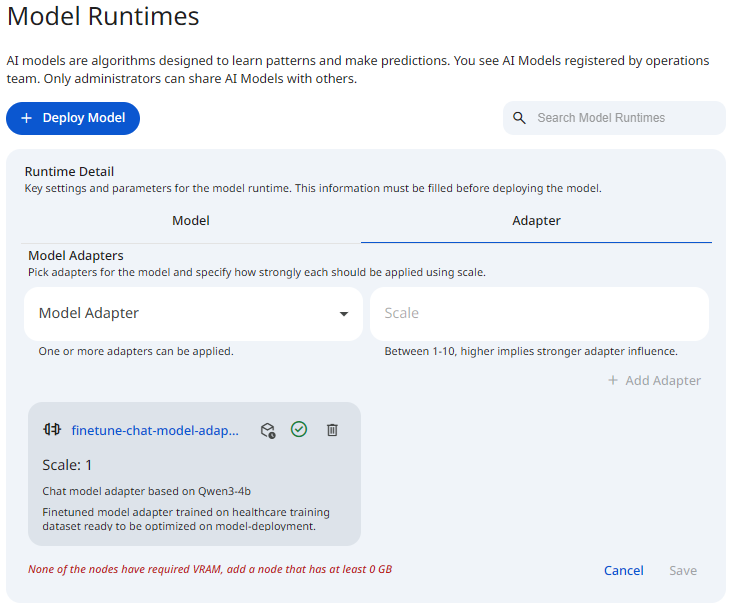
Adapters extend the behavior of a base model without modifying its original weights, making it possible to specialize the same model for different use cases by applying different adapters at runtime. The Adapter tab allows you to attach one or more fine-tuned adapters to a model deployment. Adapters are optional. If no adapters are selected, the deployment runs using only the base model.
This section is used to select adapters and control how strongly each adapter influences the deployed model.
- Model Adapter
Select an adapter from the list of available adapters. Multiple adapters can be attached to a single deployment. - Scale
The scale sets how strongly an adapter is applied at runtime. You enter a whole number from 1 to 10 when adding the adapter, and higher values weight the adapter's influence more heavily over the base model's behavior. This matters because it lets you blend a specialization in without fully overriding the base model: a lower scale applies the adapter lightly, while a higher scale leans harder on the fine-tuned behavior. The scale is set at the moment you add the adapter, and changing the scale of an adapter that has already been added is not currently supported, so to adjust it you remove the adapter and add it again with the new value.
See the screenshot below for an example Model Runtime Adapters.
 Snapshot of Protean AI Platform
Add
To attach an adapter to a deployment, open the Adapter tab, select a Model Adapter from the dropdown, enter a Scale between 1 and 10, then click Add Adapter.
Once added, the adapter becomes part of the deployment configuration and is listed below the selector.
Listing
Once added, adapters appear as cards below the selector. Each card displays the adapter identity and the configured Scale value. If no adapters are selected, an empty state is shown indicating that selected adapters will appear in this section.
Remove
Each adapter card includes a Remove action. Removing an adapter detaches it from the deployment configuration and stops applying the adapter once the updated configuration is saved. This operation does not delete the adapter artifacts from storage or remove the adapter from the registry.
- Editing the scale of an adapter that has already been added is currently not supported. To change it, remove the adapter and add it again with the new scale.
Advanced
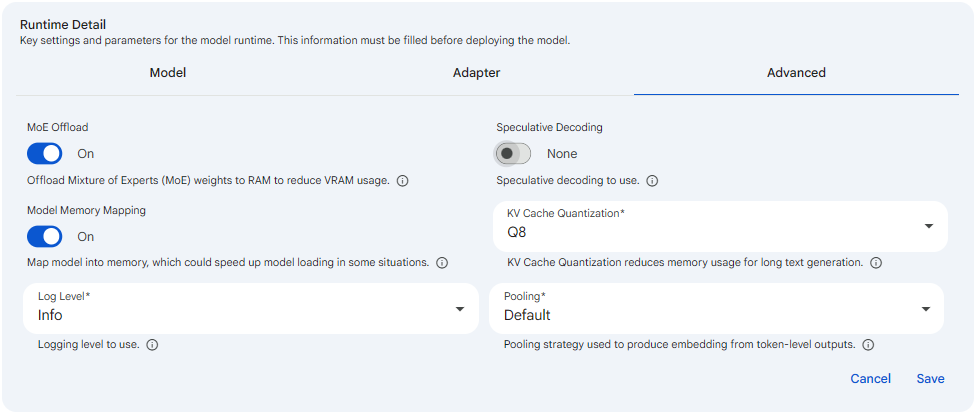
The Advanced tab holds optional inference configuration overrides that are applied at the server level when the runtime serves the model. These properties tune how the runtime loads and runs the model, including its memory footprint, generation speed, embedding behavior, and logging detail. They are optional advanced inference tuning: the defaults are sensible for most workloads, so leave them as they are unless you understand the tradeoff a particular setting introduces. Because they shape how the model is loaded and served, these values must be set before deploying. A change does not take effect on a running runtime until the deployment is saved and the runtime is started with the new configuration.
 Snapshot of Protean AI Platform
MoE Offload
MoE Offload controls whether the Mixture of Experts (MoE) weights of the model are offloaded from GPU memory (VRAM) into system memory (RAM). For MoE architectures, the expert layers make up a large share of the total weights, so keeping them in RAM instead of VRAM frees up a significant amount of GPU memory. You set it as an On or Off toggle, and it is Off by default; turning it On moves the expert weights to RAM during loading. This matters because it directly trades inference speed for a lower GPU memory footprint: when On, the model can fit on a GPU that would otherwise lack the VRAM to hold all its weights, but generation is slower because expert weights must be fetched from the slower system memory. Enable it when a model barely fits, or does not fit, on the available GPU and you are willing to accept reduced throughput in exchange for being able to run it at all.
Model Memory Mapping
Model Memory Mapping determines how the model file is brought into memory when the runtime starts. When On, the model is memory-mapped, meaning the operating system maps the file directly into the process address space and pages weights in on demand rather than reading the whole file up front; when Off, the model is read fully into memory before serving begins. It is an On or Off toggle and is Off by default, so you opt in when you want mapped loading. This matters mainly for startup behavior and memory pressure: memory mapping can speed up model loading in some situations, especially on warm caches or repeated starts, and it can reduce the peak memory used during load. Turn it On when load time or load-time memory is a concern, and leave it Off if you prefer the model to be fully resident in memory before the runtime accepts requests.
Speculative Decoding
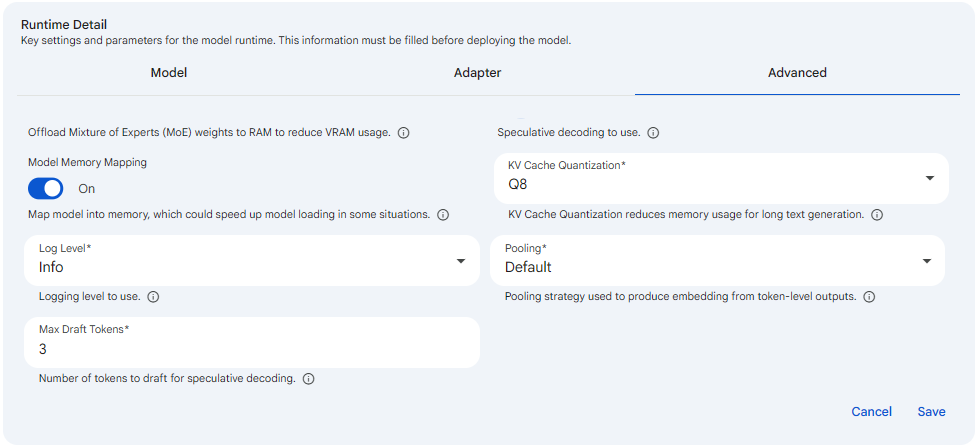
Speculative Decoding is a technique that accelerates token generation by using a smaller, faster draft model to propose several upcoming tokens, which the main model then verifies in parallel in a single pass. Accepted draft tokens are kept, and any rejected ones are discarded and recomputed, so the output remains identical to what the main model would have produced on its own. You select it from a dropdown whose options are None and MTP (a draft Multi-Token Prediction model), and it defaults to None, which disables speculative decoding entirely. It matters because, when a draft model is available and its proposals are frequently accepted, it can give noticeably faster generation, at the cost of the extra memory and compute needed to run the draft model. Selecting any value other than None reveals the Max Draft Tokens field so you can tune how aggressively tokens are drafted.
 Snapshot of Protean AI Platform
Max Draft Tokens
Max Draft Tokens sets the maximum number of tokens the draft model proposes per step during speculative decoding. It is a numeric field whose allowed range is 3 to 16, with a default of 3, and it appears only once Speculative Decoding is set to a value other than None, since it has no effect otherwise. It matters because it governs the speed and efficiency tradeoff of speculative decoding: drafting more tokens per step can improve throughput when most of the drafted tokens are accepted by the main model, but it wastes compute when many are rejected and must be recomputed. Raise it when the draft model is well matched to the main model and acceptance rates are high, and keep it lower when acceptance is uncertain so that rejected drafts do not erode the speedup.
KV Cache Quantization
KV Cache Quantization sets the numeric format used to store the key/value (KV) cache that the model maintains for the tokens it has already processed. You choose a format from a dropdown offering F16, BF16, Q8, and Q4, and the default is Q8; the same format is applied to both the key and value halves of the cache. This matters because the KV cache grows with context length and can dominate memory usage for long text generation, so quantizing it to a lower precision (Q8 or Q4) reduces memory usage substantially and lets the runtime handle longer contexts or more concurrent requests on the same hardware. The tradeoff is quality: lower precision can slightly degrade output fidelity, while higher precision (F16 or BF16) preserves accuracy at the cost of more memory. Lower it when long-context memory is the constraint, and raise it when output quality is paramount and you have memory to spare.
Log Level
Log Level sets the verbosity of the server-side logs the runtime emits. You pick one of Error, Warning, Info, or Debug from a dropdown, and it defaults to Info. Each level is cumulative in detail: Error reports only failures, Warning adds potentially unsafe conditions, Info provides standard operational logging, and Debug emits the maximum detail useful for troubleshooting. This matters for operational visibility and noise control: raising the level to Debug is the right move when you are diagnosing a startup or inference problem and need fine-grained insight into runtime behavior, while keeping it at Info or lowering it to Warning or Error keeps production logs quiet and avoids the overhead and clutter of debug output during normal operation.
Pooling
Pooling selects the strategy the runtime uses to combine token-level outputs into a single embedding vector, and it is relevant only for embedding models. You choose between Default and None from a dropdown, with Default selected initially. Default uses the model's own built-in pooling strategy to produce one embedding per input, which is what most embedding use cases expect, while None returns the raw token-level embeddings without any pooling. This matters when you are deploying an embedding model and need control over the shape of its output: leave it at Default for standard embedding generation where one vector per input is wanted, and choose None only when your downstream pipeline needs the unpooled per-token representations and will perform its own aggregation. For non-embedding models this setting has no practical effect.
Runtime
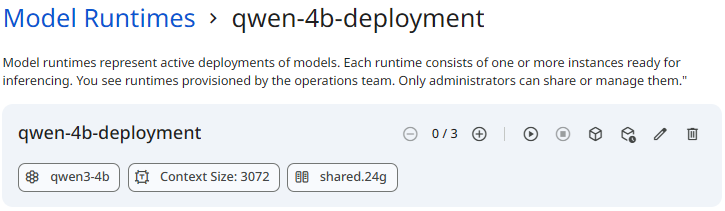
Model Runtime provides full lifecycle control over models. You can start, stop, scale, and delete deployments while maintaining visibility into runtime behavior through logs and events.
See the screenshot below for an example of Model Runtime.
 Snapshot of Protean AI Platform
Start
Starting a model runtime initializes the deployment and loads the model onto the selected execution nodes. When a runtime is started, the following actions occur:
- Compute resources are allocated
- The model is loaded into memory
- Runtime processes are initialized
- Health and readiness checks begin
Once started, the model becomes available for inference requests.
Stop
Stopping a model runtime gracefully shuts down all running instances. When a runtime is stopped, the following actions occur:
- Inference requests are terminated or drained
- Runtime processes are stopped
- Allocated resources are released
Stopped runtimes retain their deployment configuration and can be restarted without recreating deployment configurations. Stopped instances do not consume any additional compute resources, and do not restart automatically. However, if a running instance becomes unhealthy and has terminated, it will be restarted automatically.
Scale
Scaling controls how many runtime instances are active for a deployment. Scaling can be adjusted at any time while the runtime is running. The number of instances (replicas) can range from 0 to 50.
Scale up
Scaling up increases the number of active instances. Use scale up when:
- Request volume increases
- Latency rises under load
- Higher availability is required
Scale down
Scaling down reduces the number of active instances. Use scale down when:
- Traffic decreases
- Optimizing for cost efficiency
- Reducing resource consumption
Scaling operations are applied dynamically without requiring model reconfiguration.
Delete
Deleting a model runtime permanently removes the deployment. When a runtime is deleted, all associated running instances are stopped and deployment configuration is deleted. The underlying model registration artifacts remain available in the Model Registry and can be redeployed at any time. Deletion does not delete the underlying model adapter artifacts.
:::info Model Runtime Deletion
- Model can only be deleted if it is not being used by any Assistant or Agent.
:::
:::danger Caution Deletion is irreversible. Model instances and deployment configuration can't be recovered.
:::
Logs and Events
Logs and events provide operational visibility into runtimes. They help you monitor execution, diagnose failures, and understand how a deployment behaves over time at both instance and deployment scope.
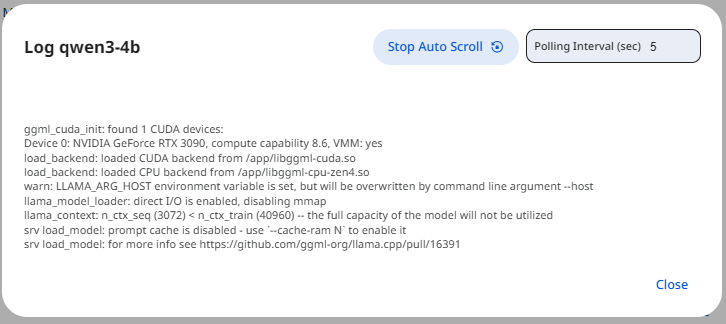
Logs
Runtime provides detailed observability to help diagnose issues and understand runtime behavior. Logs can be accessed at instance levels, individual runtime instances. Logs include inference errors and warnings
See the screenshot below for an example of Model Runtime Logs.
 Snapshot of Protean AI Platform
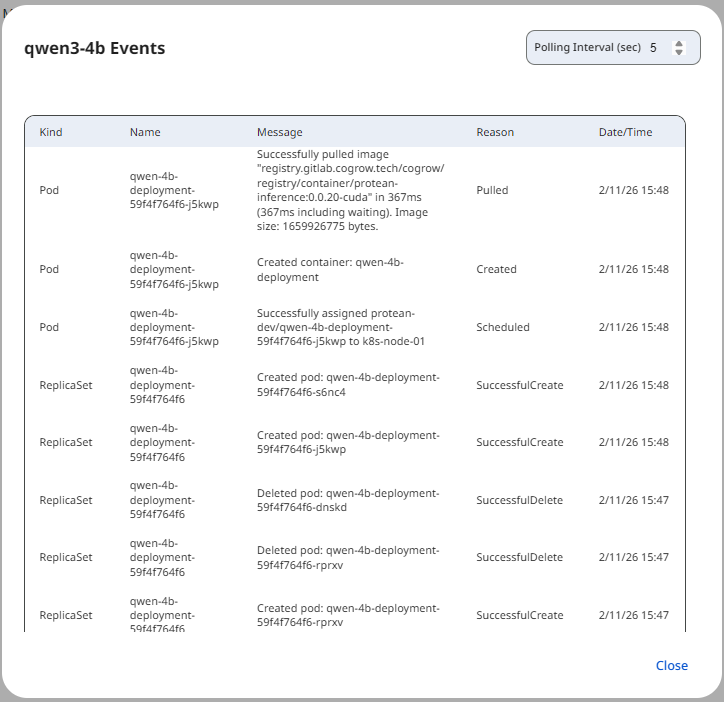
Events
Events provide a structured view of significant runtime actions and state transitions. Events are organized into two categories:
- Instance-level events show lifecycle and execution events for a specific instance
- Deployment-level events summarize changes affecting the entire runtime
See the screenshot below for an example of Model Runtime Events.
 Snapshot of Protean AI Platform
Events include:
- Scaling operations
- Scheduling decisions
- Health and readiness state changes
Access Control
Access Control in Protean AI governs who can view, create, modify, and operate resources across the platform. It is designed for enterprise environments where security, isolation, and governance are mandatory.
Protean AI follows a principle of least privilege, ensuring users and systems are granted only the permissions required to perform their tasks.
| Role→ Action↓ | Admin | Model Admin | User | Owner | Viewer | Description |
|---|---|---|---|---|---|---|
| Create | Yes | Yes | No | NA | NA | Create a model deployment. |
| Read | Yes | Yes | No | Yes | Yes | Inference a model runtime. |
| Update | Yes | Yes | No | Yes | No | Modify model deployment characterstics. Start, Stop & Scale model runtime. |
| Delete | Yes | Yes | No | Yes | No | Delete model deployment & runtime and remove it from the system. |
| Manage Access | Yes | Yes | No | Yes | No | Grant or revoke permissions for users and groups. |
:::info Model Deletion
- Deleting a model from the registry also deletes the model artifacts from the storage.
- Model can only be deleted if there are no runtime instances deployed for it and it is not being used in Finetuning.
:::
Workflow
- Select a model from Model Registry.
- Choose the quantized variant to deploy.
- Configure context size and parallel processes.
- Review the calculated VRAM requirement and node recommendation.
- (Optional) Open the Advanced tab to tune inference properties such as KV Cache Quantization, Log Level, or Speculative Decoding.
- Save the deployment configuration to create the deployment.
- This will create a deployment resource in the system with '0' desired instances.
- Scale up the deployment to start instances.
Result
After the deployment is created, it can be started in a runtime, this is when it is loaded onto the selected node and becomes available for inference. With start, stop, scaling, and deletion controls, Model Runtime provides operational flexibility without sacrificing visibility. Combined with instance-level logs and events, allows operating the model with confidence in production while maintaining reliability, efficiency, and control.