MCP Servers
MCP Servers act as a standardized bridge between AI models and real-world systems. They expose tools, resources, and prompts in a structured and secure way, allowing AI agents to interact with databases, internal services, or external endpoints without embedding system-specific logic into the model itself.
In Protean AI, MCP Servers are first-class, governable resources. An MCP Server exposes executable capabilities, called tools, to AI clients. Each tool defines a clear contract: structured input parameters, deterministic execution logic, and well-defined output.
Protean AI supports two types of MCP Servers.
- Protean for an internal MCP Server
- External for a server hosted outside Protean AI
Internal MCP Servers
Internal MCP Servers are managed and hosted by Protean AI. Protean AI provides a secure, scalable, and reliable runtime for these servers. At the moment, internal servers support only SQL-backed data access.
Support for MongoDB and other implementations is coming. Today, SQL is the only internal MCP Server type you can select.
External MCP Servers
External MCP Servers are managed outside Protean AI and connected via a network endpoint. They allow you to integrate existing MCP-compatible services without migrating them into the platform.
External servers support:
- URL-based connectivity
- Configurable authentication methods
- Centralized authorization and access control inside Protean
MCP Configuration
Configuring an MCP Server defines how it is identified, connected, secured, and executed within Protean AI. The configuration differs slightly between internal and external servers but follows a consistent structure across both. Every MCP Server requires the following core configuration:
Name
A unique identifier for the MCP Server. This name is used to reference the server across tools, agents, deployments, and authorization policies.
Description
A human-readable explanation of the server's purpose, the systems it connects to, and the types of tools it exposes. This helps users understand when and how the server should be used.
Type
Defines whether the MCP Server is Internal (managed by Protean AI) or External (managed outside Protean and connected via URL).
Timeout
The maximum time Protean AI will wait for a response when executing a tool on this server, specified in milliseconds (ms). This prevents long-running or stalled operations from blocking agent execution. The unit is milliseconds for both internal and external servers.
External MCP Configuration
Apart from the core configuration, external MCP Servers require additional connectivity settings. The following sections describe these settings.
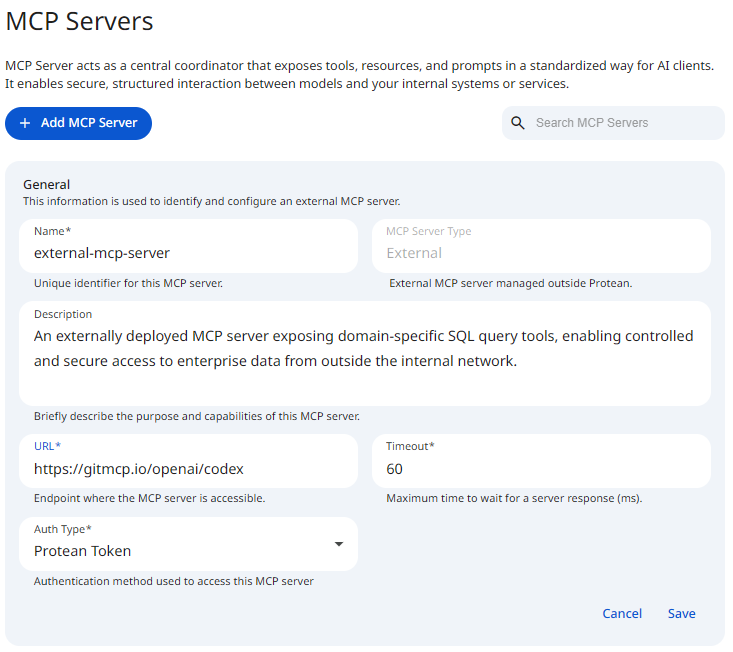
See the screenshot below for an example of MCP Server External configuration.
 Snapshot of Protean AI Platform
URL
The endpoint where the external MCP Server is accessible. Protean AI uses this URL to send requests to the server.
Authentication
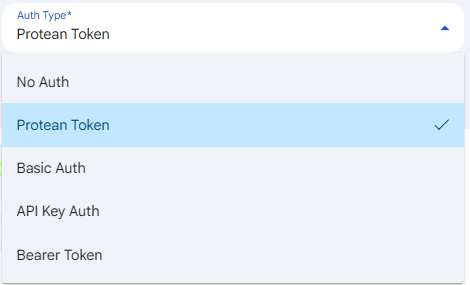
The Auth Type defines the authentication method used when communicating with the external server. This defines how the MCP server authenticates requests sent to it from Protean AI. External MCP Servers are not deployed or scaled by Protean AI. Protean acts as a secure gateway and governance layer for access. Protean AI supports the following authentication methods:
- No Auth (unauthenticated requests)
- Protean Token (requests are authenticated using a Protean-issued token). This is the default for a new external server.
- Basic Auth (a Username and Password)
- API Key Auth (an API key supplied in a request header)
- Bearer Token (an OAuth2 or JWT bearer token)
 Snapshot of Protean AI Platform
Three of these auth types, Basic Auth, API Key Auth, and Bearer Token, require you to provide credential fields. The sections below describe each one. No Auth and Protean Token require no additional input, so they have no extra fields to fill in.
Basic Auth
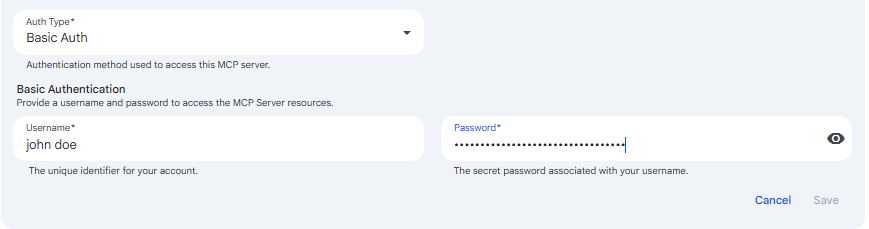
Basic Auth is HTTP basic authentication, where Protean AI presents a username and password to the external MCP Server on every request. You use it when the external server is protected by a simple username and password pair rather than a token-based scheme. It matters because it lets Protean act as the secure gateway that holds and supplies those credentials, so the username and password never have to be embedded in model or agent code.
When you select Basic Auth, you configure two fields. Username is the account identifier Protean sends to the external server, and Password is the secret value associated with that username. Both are required. Protean combines them into the standard basic authentication header it attaches to each outbound request to the server.
 Snapshot of Protean AI Platform
API Key Auth
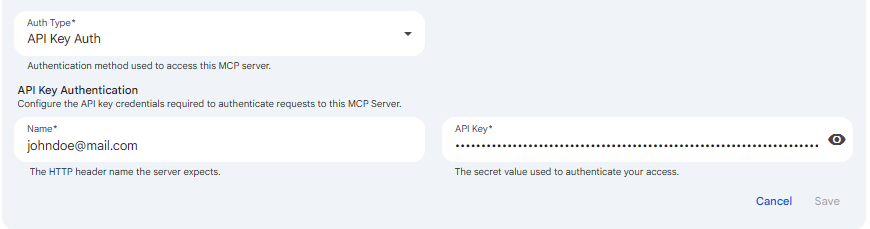
API Key Auth authenticates Protean to the external server by sending a secret key inside a named HTTP header. You use it when the server expects an API key passed through a specific header rather than through the standard Authorization header. It matters because many services issue per-client API keys and read them from a custom header, and this option lets Protean match whatever header name the server requires while keeping the key value stored securely.
When you select API Key Auth, you configure two fields. Name is the HTTP header name the server expects, for example a custom header such as X-API-Key. This is the header name, not a username, so enter exactly the header key the external server looks for. API Key is the secret value sent in that header, the credential the server validates. Both fields are required, and Protean attaches the key to the named header on every request it sends to the server.
 Snapshot of Protean AI Platform
Bearer Token
Bearer Token authentication sends a token in the standard Authorization header so the external server can verify each request. You use it when the server accepts an OAuth2 or JWT bearer token, which is the common pattern for token-based APIs. It matters because it lets Protean authenticate to modern token-secured MCP Servers while keeping the token value stored securely on the platform rather than in model or agent code.
When you select Bearer Token, you configure a single field. Token is the Bearer or JWT token string that Protean sends in the Authorization header on every request to the server. The field is required.
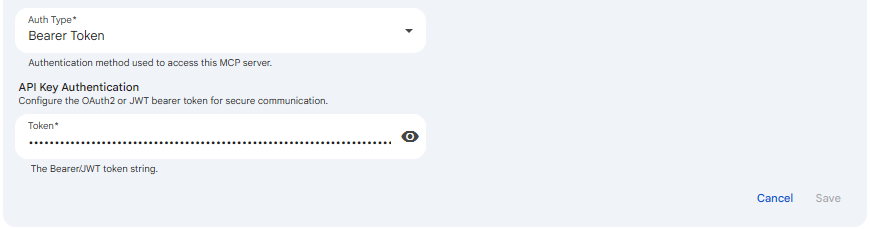 Snapshot of Protean AI Platform
The secret fields (the Basic Auth Password, the API Key, and the Bearer Token) have a show/hide visibility toggle so you can confirm what you typed before saving, while keeping the value masked by default.
Internal MCP Configuration
Apart from the core configuration, internal MCP Servers require additional infrastructure and data source settings. The following sections describe these settings.
See the screenshot below for an example of MCP Server Internal configuration.
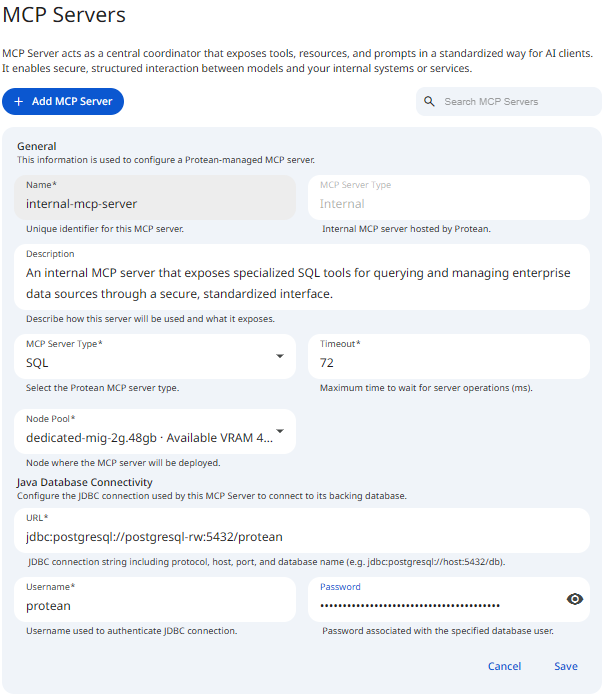 Snapshot of Protean AI Platform
Datasource Type
In addition to the general configuration, internal MCP Servers require infrastructure and data source settings. Internal MCP Servers must specify an MCP Server Type. Today, only SQL is selectable.
Support for additional backends such as MongoDB is on the roadmap, but at the moment SQL is the only type you can select.
Node Pool
Internal MCP Servers are deployed onto compute managed by Protean AI. The Node Pool field, available on the deployment tab, selects the node pool where the MCP Server runs. This is where the server is scheduled when you start its runtime.
Connection Configuration
Internal MCP Servers of SQL type connect to their backing database using JDBC. The configuration includes:
- URL
The full JDBC connection string injdbc:<vendor>://format, including protocol, host, port, and database name (for examplejdbc:postgresql://host:5432/db). - Username
The database user used by the MCP Server. - Password
The password associated with the configured database user. This field has a show/hide visibility toggle.
Credentials are stored securely and encrypted. They are not exposed to model or agent code.
Allow Execution of Model-Generated Queries
By default, the Allow execution of model generated queries setting is off. When it is off, queries are held for manual review and approval before they run, which is the safer choice. When you enable it, the model can automatically generate and execute queries against the connected database.
Enabling this setting reveals two additional sub-toggles that scope what kinds of generated statements are permitted:
- Allow Definition (DDL): lets the model create, alter, or drop database structures.
- Allow Manipulation (DML): lets the model insert, update, or delete data records.
This is an important security decision. Enabling model-generated query execution (especially the DDL and DML sub-toggles) grants the model direct, unreviewed write access to your database. Keep it off unless you fully trust the agent and the connected data source.
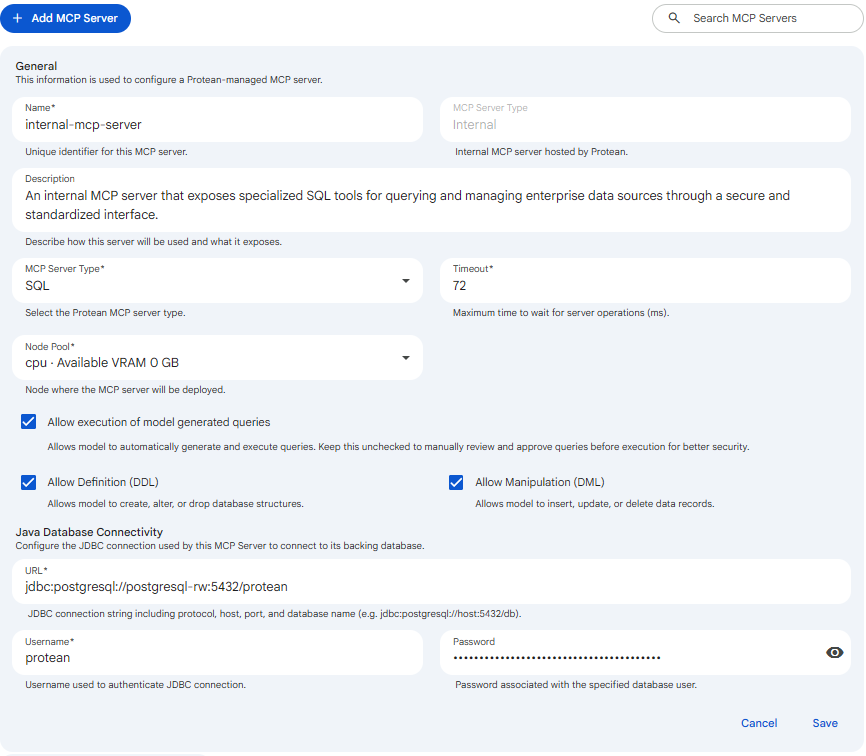 Snapshot of Protean AI Platform
Tools
Tools are the executable capabilities exposed by an MCP Server. They define what actions an AI agent can perform.
Each tool consists of:
- A unique name
- A clear, human-readable description
- Input parameters required to execute the tool
- Optional output parameters (external servers)
- An implementation (internal servers)
Tools are discoverable, searchable, and versioned implicitly through the MCP Server they belong to.
Tool Parameters
Parameters define the structured inputs required for a tool to execute successfully.
Each parameter specifies:
- Name and description
- Data type
- Whether it is required or optional
This structure allows agents to call tools reliably while enforcing strict input validation and predictable behavior.
For external MCP Servers, parameters are visible but not editable. For internal servers, parameters are fully configurable.
Tool Implementations
For internal MCP Servers, tools require an implementation that defines how the action is executed. At the moment, only SQL-based tools are supported.
SQL Implementations
Internal MCP Servers support SQL-based tools backed by JDBC connections. Each tool can define a SQL statement that is executed when the tool is called. This enables safe, controlled access to structured data without exposing database credentials or raw connections to AI models.
Deployment and Runtime
Internal MCP Servers are deployable resources. Once configured, they can be deployed to a selected node pool and managed like any other runtime in Protean AI.
Start
Starting an MCP Server runtime initializes the deployment and makes the server available for tool execution. When a runtime is started, the following actions occur:
- Compute resources are allocated
- The MCP Server process is started
- Configured data source connections are initialized
- Tool definitions are loaded and validated
- Health and readiness checks begin
Once started, the MCP Server becomes available for agent tool calls.
Stop
Stopping an MCP Server runtime gracefully shuts down all running instances. When a runtime is stopped, the following actions occur:
- In-flight tool executions are terminated
- MCP Server processes are stopped
- Active connections are closed
- Allocated resources are released
Stopped MCP Server runtimes retain their deployment and configuration settings and can be restarted without recreating the server or its tools. Stopped instances do not consume compute resources and do not restart automatically. However, if a running instance becomes unhealthy and terminates unexpectedly, it will be restarted automatically while the runtime is in a running state.
Scale
Scaling controls how many MCP Server runtime instances are active for a deployment. Scaling can be adjusted at any time while the runtime is running.
Scale up
Scaling up increases the number of active MCP Server instances. Use scale up when:
- Tool execution volume increases
- Concurrent agent calls grow
- Lower execution latency is required
- Higher availability is needed
Scale down
Scaling down reduces the number of active MCP Server instances. Use scale down when:
- Tool usage decreases
- Reducing operational cost is a priority
- Lower resource utilization is sufficient
Scaling operations are applied dynamically and do not require changes to server configuration, tools, or connected data sources.
Delete
Deleting an MCP Server runtime permanently removes the deployment. When a runtime is deleted, all running MCP Server instances are stopped and the deployment configuration is removed. The MCP Server definition, including its tools, parameters, and authorization settings, are also deleted.
To delete a deployment, and not underlying MCP Server definition, use stop or scale down instead.
:::info MCP Server Runtime Deletion
- An MCP Server runtime can only be deleted if it is not currently being used by any Agent.
:::
:::danger Caution Deletion is irreversible. MCP Server runtime instances and deployment configuration cannot be recovered.
:::
Logs and Events
Logs and events provide operational visibility into runtimes. They help you monitor execution, diagnose failures, and understand how a deployment behaves over time at both instance and deployment scope.
Logs
Runtime provides detailed observability to help diagnose issues and understand runtime behavior. Logs can be accessed at instance levels, individual runtime instances. Logs include inference errors and warnings
Events
Events provide a structured view of significant runtime actions and state transitions. Events are organized into two categories:
- Instance-level events show lifecycle and execution events for a specific instance
- Deployment-level events summarize changes affecting the entire runtime
Events include:
- Scaling operations
- Scheduling decisions
- Health and readiness state changes
Access Control
Access Control in Protean AI governs who can view, create, modify, and operate resources across the platform. It is designed for enterprise environments where security, isolation, and governance are mandatory.
Protean AI follows a principle of least privilege, ensuring users and systems are granted only the permissions required to perform their tasks.
| Role→ Action↓ | Admin | Model Admin | User | Owner | Viewer | Description |
|---|---|---|---|---|---|---|
| Create | Yes | No | No | NA | NA | Register / Create an MCP server |
| Read | Yes | No | No | Yes | Yes | View MCP servrer and use it from agents |
| Update | Yes | No | No | Yes | No | Update MCP server metadata, add and remove tools |
| Delete | Yes | No | No | Yes | No | Remove MCP server, its deployment and definition |
| Manage Access | Yes | No | No | Yes | No | Grant or revoke permissions for users and groups. |
Workflow
- Add MCP Server and Choose the MCP Server type (Internal or External).
- Configure the server settings, including description, timeout, and connection details.
- (Internal only) Configure the backing data source and deployment settings, such as node pool selection.
- Define or review the tools exposed by the MCP Server, including parameters and implementations.
- Review the configuration and authorization settings.
- Save the configuration to create the MCP Server deployment.
- This creates a deployment resource in the system with
0desired instances. - Scale up the deployment to start MCP Server runtime instances and make tools available for execution.
- Use the MCP Server from AI agents.
Result
After the MCP Server deployment is created, it can be started as a runtime. When started, the server is deployed onto the selected nodes and becomes available for tool execution by agents. With start, stop, scaling, and deletion controls, MCP Server Runtime provides operational flexibility while maintaining clear governance and visibility. Combined with runtime status, instance-level logs, and execution events, MCP Servers can be operated confidently in production, ensuring reliable tool execution,