Model Registry
Model Registry is a centralized library for AI and machine learning models. It enables you to discover, evaluate, quantize, and deploy models on Protean AI. The registry integrates with HuggingFace, allowing you to download supported models and prepare them for deployment.
Model Registry provides the following advantages:
- Models are all available in a single location
- Model Registry provides a consistent registration pattern for different types of models
- Model Registry provides built-in integration with other parts of Protean AI such as model fine-tuning, evaluation, and serving
- Serving generative AI models can be difficult, Protean AI handles model deployment and serving for you. Registering the model is all you need to do, to get started.
Model Configuration
Registering a model happens in two steps. You first register the model with a minimal form, then you edit its metadata afterward on the model detail page.
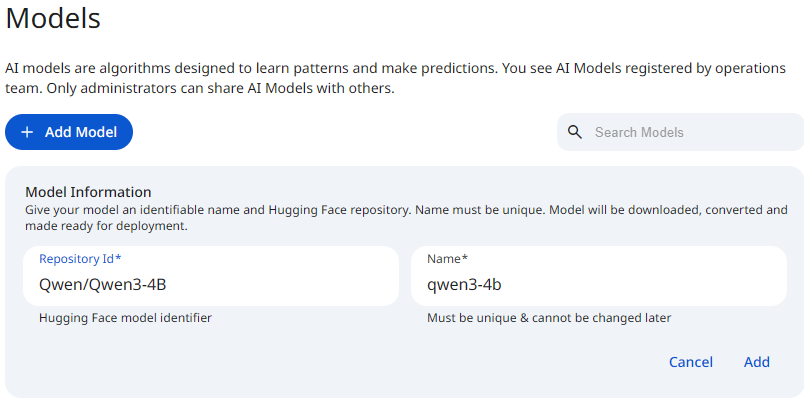
The initial registration form collects only two fields:
- Repository Id: the Hugging Face model repository identifier of the model to register. This is copied from the Hugging Face repository.
- Name: a unique name used to identify the model.
After the model is registered, it is downloaded and converted. You then open the model detail page to quantize it and to edit its metadata (Title, Purpose, Modalities, Features, and Description) using the metadata form.
See the screenshot below for an example of Model Registry Configuration.
 Snapshot of Protean AI Platform
Name
The Name is a unique identifier for the model. It must be unique across all models in the registry and cannot be changed later. As you type, the value is lowercased and any spaces are automatically converted to hyphens, so a name like My Model becomes my-model. When you enter a Repository Id first, the Name is pre filled from the repository name (the portion after the slash, lowercased), which you can then adjust.
Model Repository Id
A Model Repository ID (often called repo_id or model_id) is the unique identifier used to locate and download a specific model from the Hugging Face Hub.
It acts like an address that tells Protean AI exactly which model weights and configuration files to load.
The ID typically follows this standard format:
username_or_org/model_name
- Namespace (User/Org): The username of the creator or the organization (e.g.,
meta-llama,google,mistralai). - Model Name: The specific name of the repository (e.g.,
Llama-2-7b-chat-hf,bert-base-uncased).
Real-World Examples
| Model Family | Repository ID Example | Description |
|---|---|---|
| BERT | google-bert/bert-base-uncased | Standard BERT model by Google. |
| Llama 3 | meta-llama/Meta-Llama-3-8B | Llama 3 foundation model by Meta. |
How to Find a Model ID
- Navigate to the Hugging Face Models Hub.
- Search for the model you need (e.g., "Llama-3" or "Bert Uncased").
- Click on the model card to open the details page.
- Look at the top header of the page; the Repository ID is the text string next to the copy icon (two overlapping squares) located just right of the model name.
- Click the copy icon to save the ID (e.g.,
meta-llama/Meta-Llama-3-8B) to your clipboard.
Quantization
Quantization reduces model precision to lower bit widths while preserving functional accuracy. You use quantization to run larger models on the same hardware, reduce memory pressure, and increase inference throughput. This capability directly improves deployment efficiency and lowers infrastructure cost. Quantization converts model weights and activations from FP16 or BF16 to lower precision formats such as INT8. This change delivers immediate and measurable benefits.
- Reduced memory footprint enables more concurrent requests.
- Smaller models load faster.
- Reduced resource usage lowers operational cost per inference.
In production environments where memory bandwidth limits performance, quantization provides a decisive advantage.
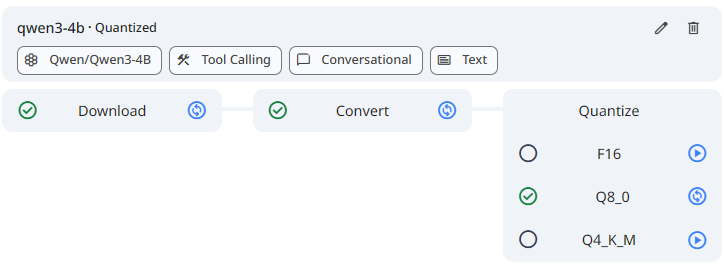
When you quantize a model, you select one of the following precision levels:
| Level | Description |
|---|---|
F32 | 32-bit floating point. Standard high precision format. |
BF16 | 16-bit floating point. Reduces memory slightly while maintaining accuracy. |
F16 | 16-bit floating point. Reduces memory slightly while maintaining accuracy. |
Q8_0 | 8-bit integer. Memory efficient inferencing with minimal accuracy loss. |
Q4_K_M | 4-bit integer. Maximizes memory efficiency, though it may reduce accuracy. |
:::info Empirical Analysis Most production models store parameters in FP16 or BF16, where each parameter occupies two bytes. INT8 quantization stores each parameter in one byte.
Example model size
- Model with 7 billion parameters
- In FP16 or BF16:
- FP16 or BF16 use 2 bytes per parameter
- Total memory usage: approximately 14 GB
- Quantized To INT8:
- INT8 uses 1 byte per parameter
- Total memory usage: approximately 7 GB
- In FP16 or BF16:
Result Quantization reduces model memory usage by approximately fifty percent. This reduction often determines whether a model fits on a single device or not.
:::
- Most effective when deployments are constrained by memory footprint or inference latency.
- Particularly suited for edge/embedded environments and high-throughput serving systems.
- Enables cost-efficient production workloads by reducing hardware and operational requirements.
:::danger Caution
- Quantization reduces numerical precision and directly affects model accuracy. You must assess this impact before using quantized models in production.
- Avoid quantization when the application requires exact numerical reproducibility of accuracy.
:::
See the screenshot below for an example Model Quantization.
 Snapshot of Protean AI Platform
Title
The title provides a short and clear identifier for the model. It communicates the model's purpose or architecture in a concise form and enables quick recognition in the registry and user interfaces.
Purpose
Purpose defines the primary task the model performs during inference. It guides how you deploy the model and how applications interact with it.
Common purposes include:
-
Chat
Generate conversational responses while maintaining dialogue context across multiple turns. Use chat models for assistants, agents, and interactive applications that require memory of prior messages and conversational flow.
Example: A customer support assistant that answers follow up questions based on earlier user inputs. -
Text generation
Generate text from a single prompt without maintaining conversational state. Use text generation models for one shot or batch generation tasks where each request is independent.
Example: Generating a product description or summarizing a document from a provided prompt. -
Embedding
Convert input data into dense vector representations for semantic understanding. Use embeddings for retrieval augmented generation, clustering, and similarity search.
Example: Creating vector embeddings for documents to power a semantic search index. -
Reranking
Score and reorder a list of candidate items based on relevance to a query. Use reranking models after an initial retrieval step to improve result quality.
Example: Reordering search results returned by a vector database to improve relevance. -
FIM
Perform fill in the middle generation by predicting missing content between surrounding context.
Example: Completing a missing code block between two existing functions in a source file. -
Other
Use this when the model does not fit any of the categories above. It registers the model without committing it to a specific task pattern.
Example: A specialized or experimental model whose primary task is not represented by the other options.
Defining the purpose ensures the model is deployed and consumed according to its intended behavior and execution pattern.
Modalities
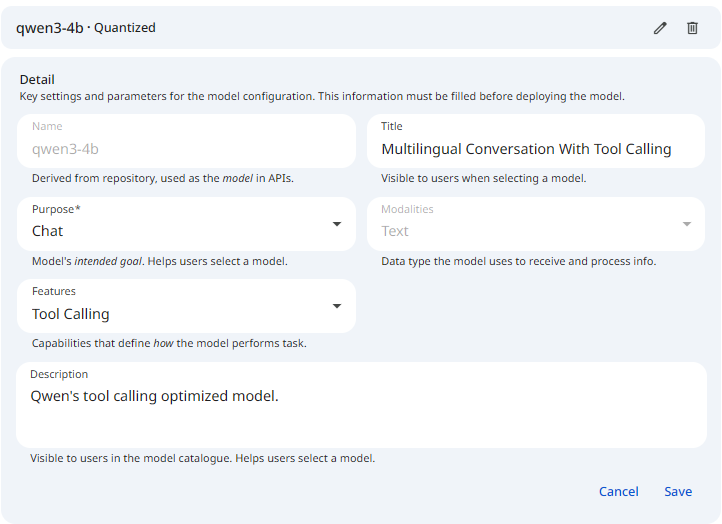
Modalities describe the types of input and output data the model supports. They define how the model interacts with data during inference. This is not a field you choose. The metadata form displays Modalities as Text and locks it, because only the Text modality is supported at this time. The value is shown for reference and cannot be changed.
Features
Features describe optional model capabilities that influence how the model behaves during inference. While these features may not affect current execution paths, accurate registration ensures future compatibility with orchestration, tooling, and downstream integrations.
Register features carefully, as application logic and runtime behavior may depend on them over time.
Common features include:
-
Thinking
Indicates that the model supports internal reasoning before producing a final output. This capability is relevant for tasks that require multi step problem solving, planning, or complex decision making.
Example: Solving a logical reasoning problem or performing step by step analysis before returning an answer. -
Tool calling
Indicates that the model can invoke external tools or APIs as part of its response generation. This capability enables integration with function execution, data retrieval, and action based workflows.
Example: Calling a search API to fetch real time information before generating a response.
Accurate feature specification improves long term interoperability and ensures the model can be correctly integrated as platform capabilities evolve.
Description
The description provides a detailed explanation of the model. It captures the model's functionality, intended use cases, key capabilities, and any important constraints. The description gives users enough context to decide whether the model is suitable for deployment.
The Title, Purpose, Modalities, Features, and Description above are not part of the initial registration form. You edit them on the model detail page using the metadata form, after the model has been registered.
See the screenshot below for an example of the metadata form.
 Snapshot of Protean AI Platform
Access Control
Access Control in Protean AI governs who can view, create, modify, and operate resources across the platform. It is designed for enterprise environments where security, isolation, and governance are mandatory.
Protean AI follows a principle of least privilege, ensuring users and systems are granted only the permissions required to perform their tasks.
| Role→ Action↓ | Admin | Model Admin | User | Owner | Viewer | Description |
|---|---|---|---|---|---|---|
| Create | Yes | Yes | No | NA | NA | Register a model. |
| Read | Yes | Yes | No | Yes | Yes | Deploy the model. |
| Update | Yes | Yes | No | Yes | No | Modify model metadata. |
| Delete | Yes | Yes | No | Yes | No | Deregister the model and remove it from the system. |
| Manage Access | Yes | Yes | No | Yes | No | Grant or revoke permissions for users and groups. |
:::info Model Deletion
- Deleting a model from the registry also deletes the model artifacts from the storage.
- Model can only be deleted if there are no runtime instances deployed for it, and it is not being used in Finetuning.
:::
Access control ensures that model usage aligns with organizational policies while maintaining operational flexibility for development and deployment workflows.
Workflow
- Search for and copy the model's repository id from Hugging Face.
- Register the model by entering the Repository Id and a Name. The model is then downloaded and converted.
- Open the model detail page to quantize the model as required.
- Edit the model metadata (Title, Purpose, Modalities, Features, and Description) on the detail page.
Result
After registration, the model can be deployed by authorized users.