Node
Node Registration is a centralized inventory of Kubernetes node profiles used to run models, finetune runs, MCP servers & agent workloads on Protean AI. A Node defines the type and size of Kubernetes nodes required for deployment, ensuring the runtime has the required compute, memory, and scaling capabilities.
In the context of this documentation, the term workload implies either model inference runtime, fine-tuning, MCP server or agent.
Node Registration provides the following advantages:
- Node profiles are available in a single location
- Node definitions provide a consistent registration pattern for different infrastructure tiers (CPU, GPU, high-memory)
- Nodes integrate with downstream capabilities such as workload deployment and scaling policies
- Node requirements are captured explicitly, avoiding deployment failures due to missing capacity or scheduling mismatch
Node Configuration
To register a node, define the scheduling and capacity characteristics that Protean AI should rely on during deployment. The exact fields may vary by cluster setup, but the intent is consistent: describe where workloads may run and what resources are expected to be available. Common configuration elements include:
- A node name to identify the node profile
- Kubernetes scheduling constraints (labels / selectors, and optional tolerations)
- Compute & memory expectations
- GPU characteristics
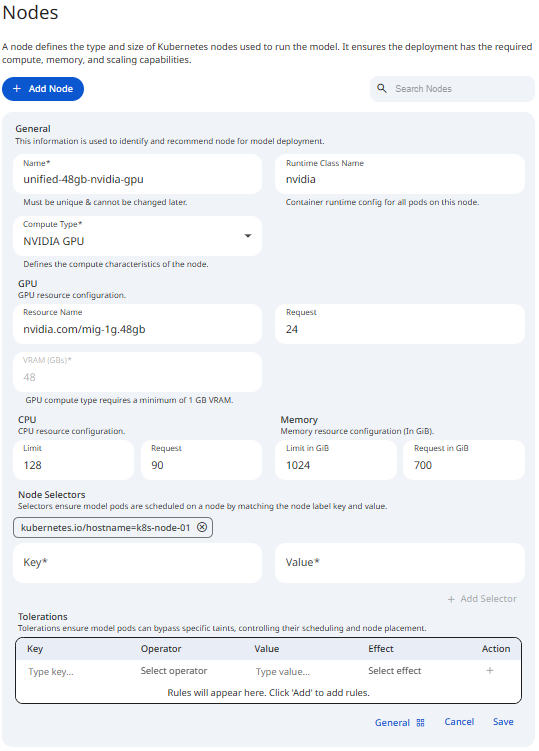
See the screenshot below for an example of Node Configuration.
 Snapshot of Protean AI Platform
Name
The Name is a unique identifier for the node profile. It is used to select deployment targets during workload runtime operations. It must be unique across all nodes and can contain alphanumeric characters.
Spaces typed into the Name field are automatically converted to hyphens. The name is locked after creation and cannot be changed later.
Workload Type
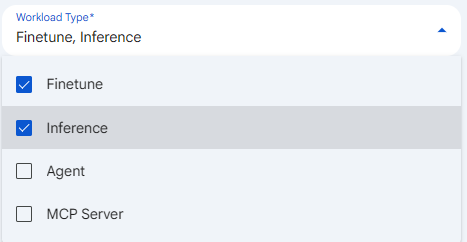
Workload Type is a required, multi-select field that declares which kinds of workloads this node profile is allowed to host. You set it by selecting one or more of the values below, and a node must have at least one workload type before it can be saved. The choices are used downstream to filter and recommend compatible nodes during deployment, so a node only appears as a target for the workload kinds it has been marked to host. Restricting workload types matters because it keeps unrelated traffic off specialized hardware, for example reserving GPU nodes for inference and fine-tuning while keeping lightweight agent and MCP Server pods on general-purpose compute.
- Finetune
- Inference
- Agent
- MCP Server
The selected workload types also determine what the Node Utilization List shows on the node detail page, because only the workload kinds enabled here are queried and rendered for that node.
 Snapshot of Protean AI Platform
Maximum Instances
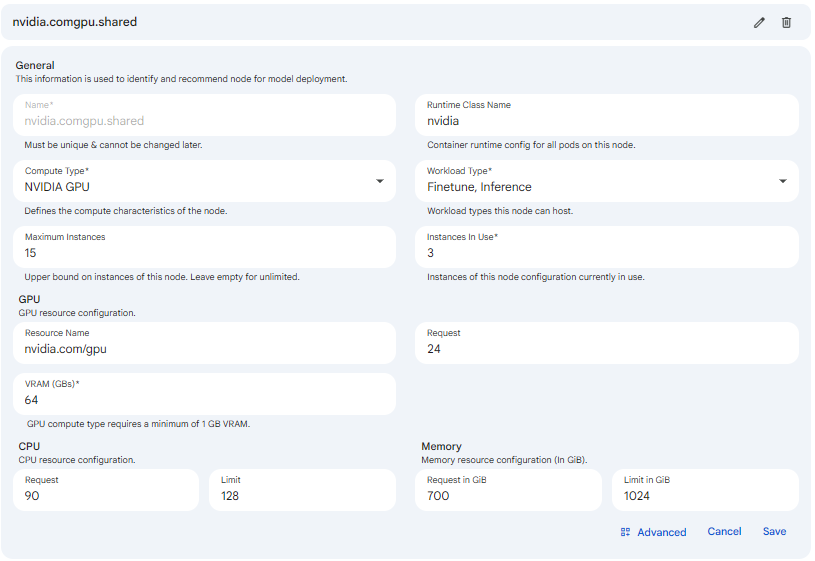
Maximum Instances is an optional whole number that sets an upper bound on how many instances of this node configuration may exist at once. You enter it as a non-negative whole number, and leaving it empty means unlimited, allowing Kubernetes to scale instances as demand requires. It matters because it acts as a capacity ceiling: it prevents a single node profile from consuming more cluster resources than intended and gives operators a predictable cap on how far a workload can scale out. When a maximum is set, the node detail header surfaces usage against it as an instances-used-out-of-maximum tag.
Instances In Use
Instances In Use is a required whole number greater than or equal to zero that records how many instances of this node configuration are currently in use. It is shown only when editing an existing node, since a brand-new node has no instances yet, and it defaults to zero. Operators set it to reflect real consumption so the platform can track how loaded a node profile is and compare that against Maximum Instances. It matters because the used and maximum values together drive the capacity tag on the node detail header and inform whether the node still has headroom for additional deployments.
Compute Type
This property defines the underlying hardware acceleration architecture used by the node. Selecting the correct compute type ensures that Protean AI initializes the appropriate runtime drivers and container hooks required for the model to execute. Administrators can configure the following compute types:
- CPU:
- Utilizes standard x86 or ARM processor cycles for workload execution.
- Best suited for smaller models, embedding tasks, MCP servers & agents.
- Does not require specialized hardware drivers in the container runtime.
- NVIDIA GPU:
- Enables hardware acceleration via NVIDIA Graphics Processing Units.
- Required for large language models (LLMs) and complex generative tasks.
:::note GPU auto-configuration
Selecting NVIDIA GPU as the Compute Type reveals the GPU resource fields and the VRAM (GBs) field, which are hidden for CPU nodes. It also auto-fills the GPU resource name nvidia.com/gpu with a request of 1 and a limit of 1. The VRAM (GBs) field requires a minimum of 1 GB for GPU nodes. When the GPU resource name follows a MIG format, the VRAM value is derived from the name and the field becomes read-only.
:::
Runtime Class
In Kubernetes, a RuntimeClass is a way to tell the cluster that certain Pods need a specific container runtime configuration.
The NVIDIA GPU Operator is a Kubernetes operator that automates the process of installing and configuring the NVIDIA Container Runtime on Kubernetes clusters.
It is responsible for installing the NVIDIA Container Runtime on the cluster nodes and configuring the nvidia Runtime Class.
Without this RuntimeClass, a Pod might be scheduled on a node with a GPU, but it won't be able to run CUDA commands or access the hardware.
The nvidia class acts as a bridge: when a Pod uses it, Kubernetes knows it must use the NVIDIA Container Runtime instead of the standard runtime (like runc).
NVIDIA Container Runtime allows a container to "see" and use the physical NVIDIA GPU hardware on the host node by injecting the necessary drivers and libraries into the container at startup.
Implementation Details
- Hardware Passthrough: Without the
nvidiaRuntime Class, the model will be unable to communicate with the GPU hardware, even if the node has physical cards installed and the GPU requests are configured. - Consistency: Administrators must ensure that the
nvidiaRuntime Class is pre-installed and defined at the cluster level (via aRuntimeClassresource) before registering the node in Protean AI.
GPU
The GPU property in the node registration allows you to specify both the hardware type and the quantity of resources required. This property supports standard Nvidia GPU requests as well as Multi-Instance GPU (MIG) configurations.
- Resource Name: Identifies the specific GPU model or partition type (e.g.,
nvidia.com/gpu,nvidia-a100-80gb), this should match the name of the GPU device on the node. - Request: The number of GPU units (must be a whole number, no decimals) or partitions assigned to the workload. The GPU resource uses Resource Name and Request only, there is no separate limit field.
Protean AI also supports MIG profiles, see MIG user guide for more information. When a MIG profile is used as the GPU name, the system automatically calculates the available VRAM based on the profile's hardware specifications.
- VRAM Extraction: If the GPU name follows a MIG format (e.g.,
mig-1g.10gbormig-3g.40gb), the system extracts the VRAM capacity directly from the name (e.g., 10GB or 40GB).
VRAM
VRAM (Video RAM) is the dedicated memory on a GPU that stores model weights, KV caches, and intermediate activations. VRAM is managed by the GPU driver rather than the Linux kernel, hence Kubernetes does not natively "slice" VRAM out of the box.
Protean AI supports the following methods to manage VRAM allocation:
- GPU Count (nvidia.com/gpu): The number of whole GPU units requested. (See the GPU Request field above)
- Requesting
1GPU gives the model exclusive access to that entire card's VRAM.
- Requesting
- GPU Sharing (Time-Slicing/MIG): Allows multiple models to reside on the same physical GPU by partitioning the VRAM.
- MIG (Multi-Instance GPU): Provides hardware-level isolation for VRAM and compute.
- Time-Slicing: Allows oversubscription of the GPU but does not provide memory protection; one model can still crash others by consuming all VRAM.
CPU
CPU management in Protean AI controls the processing power allocated to the workloads. If a workload exceeds its allocated share, Kubernetes will throttle its performance rather than terminating the process.
- CPU Requests: The minimum processing power guaranteed to the workload.
- The Kubernetes scheduler uses this value to place pods; a workload will only be scheduled on a node with enough unreserved CPU to satisfy the request.
- CPU Limits: The absolute maximum processing power a workload can consume. When a workload reaches this limit, its execution is throttled, which can lead to increased latency in workload inference.
Administrators often set higher limits than requests to allow workloads to "burst" during complex inference tasks.
:::caution Validation The CPU Request must be a whole number and cannot exceed the CPU Limit.
:::
Memory
Memory management in Protean AI ensures that workloads are allocated sufficient RAM to function while preventing them from destabilizing the host node. When registering a Node or configuring a deployment, memory is defined through two primary constraints:
- Memory Requests: The minimum amount of memory guaranteed, Kubernetes will only schedule a workload on a node with enough available capacity to satisfy the request.
- Memory Limits: The absolute maximum amount of memory a container is allowed to consume.
:::info Memory Units
Memory is expressed in Gi (Gibibyte).
:::
:::caution Validation The Memory Request must be a whole number and cannot exceed the Memory Limit.
:::
Administrator Best Practices
For administrators, the relationship between requests and limits defines the Quality of Service (QoS) for the workload:
| Strategy | Configuration | Rationale |
|---|---|---|
| Guaranteed QoS | Request == Limit | Highest stability. The node reserves the full amount, and the workload is less likely to be evicted during resource contention. |
| Burstable QoS | Request < Limit | Allows for efficiency. The workload is guaranteed the request but can "burst" to the limit if the node has spare capacity. |
| Overcommit Risk | High Limit / Low Request | Dangerous for production. If many workloads burst simultaneously, the node may run out of memory, causing the OOM killer to terminate pods unpredictably. |
:::danger OOMKilled Warning
If workload crashes with an OOMKilled error, it is either exceeding its defined Limit or the host node has run out of physical memory entirely.
Administrators should monitor peak usage and adjust the Limit to be approximately 20-40% above the peak average to provide a safety buffer.
:::
Advanced: Node Selectors and Tolerations
Node Selectors and Tolerations are not shown by default. They are revealed by switching the form's Advanced toggle on (the toggle flips between General and Advanced views at the bottom of the configuration form). The Node Configuration screenshot above shows these advanced fields alongside the GPU resource and VRAM fields.
Node Selector
The Node Selector is a hard constraint that tells the Kubernetes scheduler which specific nodes are required for a workload deployment. For administrators, this is the most direct way to pin workloads to nodes with specific hardware labels, such as GPUs, high-performance NVMe storage, or specific availability zones.
Configuration Properties
In the Protean AI node registration form, a Node Selector is defined using standard Kubernetes label matching:
- Key: The specific label key assigned to the Kubernetes nodes (e.g.,
gpu-typeordisktype). - Value: The exact string value that the node label must have to be considered a match (e.g.,
a100orssd).
Tolerations
In Protean AI, Tolerations allow influencing the scheduling of workloads onto specific infrastructure. While Taints are applied to nodes to "repel" pods, Tolerations are applied to the node registration to ensure that workloads intended for this node can bypass those restrictions. For administrators, this is the primary mechanism for directing high-performance inferencing / fine-tuning to specialized hardware while keeping general-purpose workloads on standard compute nodes.
Configuration Properties
When defining a Toleration for a node, the following properties must be defined to match the Taints existing on node definition on Kubernetes cluster:
- Key: The specific label key applied to the node (e.g.,
nvidia.com/gpuordedicated). - Operator:
- Exists: The toleration matches if the key exists on the node, regardless of the value.
- Equal: The toleration matches only if both the key and the Value are identical.
- Value: The specific value string that the toleration matches (required only if the operator is
Equal). - Effect: Defines the scheduling behavior for pods that do not match the taint:
- NoSchedule: New pods will not be scheduled on the node unless they have a matching toleration.
- PreferNoSchedule: The scheduler will try to avoid placing a pod on the node, but it is not a strict requirement.
- NoExecute: Any existing pods on the node that do not tolerate the taint will be evicted immediately.
Node Detail Page
Selecting a node from the Nodes list opens its detail page, which is the single place to inspect, edit, and operate one node profile. The page opens with a summary header card and then lets you switch between two views of the node below it.
Node Summary Header
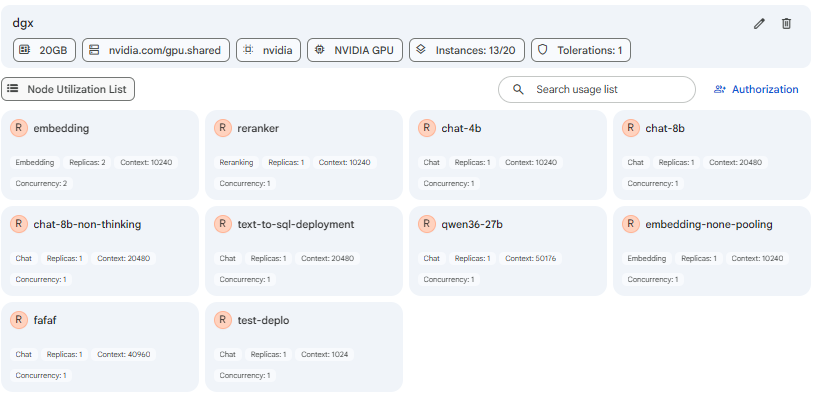
The header card presents the node's key characteristics as a compact row of tags so operators can read the node's shape at a glance without opening the form. It is rendered from the saved node and shows only the tags that apply to that node. The tags are:
- VRAM, shown as a gigabyte value, for GPU nodes that declare video memory.
- GPU Resource Name, the Kubernetes resource identifier such as
nvidia.com/gpu, present only when a GPU resource is configured. - Runtime Class, the RuntimeClass the node uses (for example
nvidia), present only when one is set. - Compute Type, either CPU or NVIDIA GPU, indicating the hardware acceleration architecture.
- Instances, shown as the number in use, or as instances-used out of the maximum when Maximum Instances is set, so operators can see remaining headroom.
- Tolerations, a count of the tolerations defined on the node, present only when at least one is configured.
These tags matter because they let an operator confirm a node's capacity and scheduling shape before assigning new workloads to it, without reopening the configuration form.
Authorization and Node Utilization Views
Below the summary header, a toggle switches the detail page between two views. The Authorization view manages who can read, update, and operate the node by adding actors (users or groups) and assigning roles, following the access model described below. The Node Utilization List view shows what the node is actually running right now. Switching between them is how an operator moves between governing a node and observing its live load. When the utilization view has nothing to show, the page automatically falls back to the Authorization view.
Node Utilization List
The Node Utilization List shows the workloads currently scheduled onto the node, so operators can see what a node is running and how heavily it is loaded. It is populated by querying, per node, only the workload kinds enabled in the node's Workload Type field: Model Runtimes for Inference, Agents for Agent, MCP Servers for MCP Server, and Finetune Configurations for Finetune. Each result is rendered as a card carrying a workload-type avatar, the workload's name and description, and a set of tags. A search field above the list filters the cards by name, workload type, or tag. Clicking a card's title opens that workload in a new tab so the operator can drill into it directly.
For model runtime (Inference) deployments, each card surfaces the operationally important load characteristics as tags:
- Purpose, the role the deployment serves.
- Replicas, the number of running copies of the deployment.
- Context size, the deployment's configured context window.
- Concurrency, the total concurrent requests allowed across all replicas, derived from replicas multiplied by parallel processes.
This view matters because it gives operators a direct, per-node read on utilization: which model runtimes, agents, MCP servers, and fine-tune jobs depend on the node, and how much concurrent capacity they consume, which is essential before scaling, draining, or deregistering the node.
 Snapshot of Protean AI Platform
The Node Utilization List only shows the workloads you have permission to see. Because of this, the number of cards in the list can be smaller than the node's Instances In Use count: the node may be running more workloads than are listed, with the difference being workloads you do not have access to. If the list looks shorter than the reported instances in use, it does not mean instances are missing, only that some of them belong to resources outside your access.
Editing a Node and Instances In Use
Editing an existing node from the detail page reopens the configuration form with the saved values, including the Instances In Use field that is hidden during initial creation. Because the node already exists, this field becomes available so operators can record how many instances of the configuration are currently consumed. Updating it keeps the capacity tag on the summary header accurate relative to Maximum Instances.
 Snapshot of Protean AI Platform
Access Control
Access Control in Protean AI governs who can view, create, modify, and operate resources across the platform. It is designed for enterprise environments where security, isolation, and governance are mandatory.
Protean AI follows a principle of least privilege, ensuring users and systems are granted only the permissions required to perform their tasks.
| Role→ Action↓ | Admin | Model Admin | User | Owner | Viewer | Description |
|---|---|---|---|---|---|---|
| Create | Yes | No | No | NA | NA | Register a node. |
| Read | Yes | No | No | Yes | Yes | Deploy a workload on the nodel. |
| Update | Yes | No | No | Yes | No | Modify node metadata. |
| Delete | Yes | No | No | Yes | No | Deregister the node and remove it from the system. |
| Manage Access | Yes | No | No | Yes | No | Grant or revoke permissions for users and groups. |
:::info Node Deletion
- Deleting a node from the registry does not impact node definition in the cluster. This ensures that the node is not available for deployment until it is re-registered.
- Node can only be deleted if it is not being used.
:::
Access control ensures that workload usage aligns with organizational policies while maintaining operational flexibility for development and deployment workflows.
Workflow
- Navigate to the Nodes list to view existing infrastructure or register a new node.
- Select a node to view its detailed configuration and authorization settings.
- Configure the node parameters: Name, Compute Type, Workload Type, Maximum Instances, GPU and VRAM (GBs) (for NVIDIA GPU nodes), CPU, Memory, and optionally the Advanced Node Selectors and Tolerations.
- Save the configuration.
- Authorize specific actors (users or groups) and assign roles to control who can deploy workloads to this specific node.
Result
Once a node is registered and authorized, it becomes available as a target destination during the Model Deployment / Fine-tuning / MCP Server Deployment / Agent Deployment processes. Authorized users will see the node as a compatible hosting.