Experiment Control & Recovery
Protean AI is designed for iterative, fault-tolerant, and reproducible fine-tuning. Rather than treating training runs as disposable, Protean AI treats them as stateful experiments that can be cloned, resumed, extended, or branched safely.
This page documents the supported operations for continuing or evolving fine-tuning runs.
Clone Fine-Tune Configuration
Cloning a fine-tune configuration creates a new fine-tuning run using the same configuration as an existing one.
This operation copies:
- Model selection
- Training dataset and revision
- Hyperparameters
- Evaluation and snapshot settings
It does not copy:
- Training state
- Optimizer state
- Adapter weights
The new run always starts from the base model.
When to Use
Use Clone Configuration when:
- Running controlled experiments with slight parameter changes
- Testing alternative hyperparameter values
- Comparing datasets while keeping training logic identical
- Creating a clean baseline without inheriting previous learning
Result
- A new fine-tune run is created
- Training starts from scratch
- Results remain comparable due to shared configuration
See the screenshot below for an example of Clone Finetune Configuration.
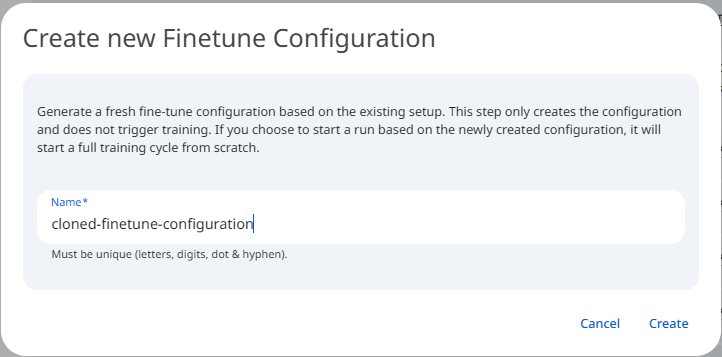 Snapshot of Protean AI Platform
Resume a Specific Failed Trial
Resuming a fine-tune run restores the training process from a previously saved snapshot. This allows training to continue without loss of progress. Protean AI supports multiple resume strategies depending on failure context and intent.
If a fine-tuning trial fails (e.g., due to node failure, OOM, transient error), a specific trial can be restarted.
This operation:
- Restores the trial from its last valid snapshot
- Uses the original configuration
- Preserves trial identity
When to Use
Use this when:
- Failure was infrastructure-related
- Configuration is known to be correct
- Training progress should be preserved
Result
- The same trial continues
- Metrics remain part of the same trial history
- No new trial is created
See the screenshot below for an example of Resume a Specific Failed Trial.
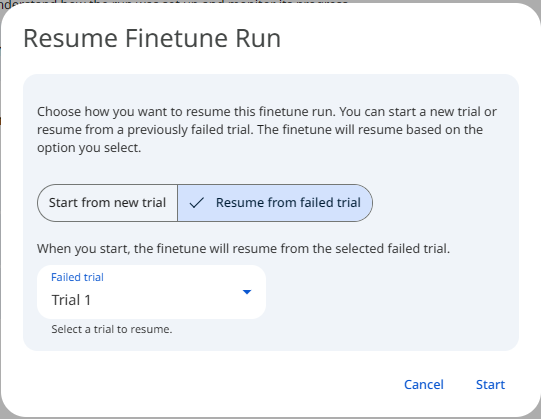 Snapshot of Protean AI Platform
Add a New Trial After a Failed Trial
Instead of resuming a failed trial, a new trial can be added to the fine-tune run. This starts a fresh training attempt from the base model rather than restoring the failed trial from its last snapshot. It is the right choice when the failure may stem from the configuration itself, since a clean retry avoids carrying forward whatever caused the trial to fail.
The new trial:
- Starts from the base model
- Uses the same configuration
- Has a new trial identity
When to Use
Use this when:
- Failure may be configuration-related
- You want a clean retry
- Comparing multiple attempts is desired
Result
- Failed trial remains visible for auditability
- New trial is tracked independently
- Best-performing trial can be selected later
See the screenshot below for an example of Add a New Trial After a Failed Trial.
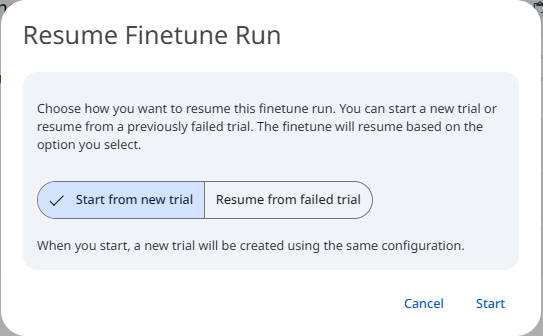 Snapshot of Protean AI Platform
Add Trials to an Existing Fine-Tune Run
A fine-tune run can contain multiple trials, each representing an independent training attempt. Because every trial shares the same base configuration but is evaluated on its own, grouping them under one run lets you explore variations and compare results side by side. This matters when you need confidence that a result is robust rather than the product of a single lucky or unlucky run.
Adding trials allows:
- Hyperparameter exploration
- Stability testing
- Performance comparison
All trials:
- Share the same base configuration
- Are evaluated independently
- Contribute to adapter selection
When to Use
Use this when:
- Running multiple attempts for robustness
- Evaluating sensitivity to randomness
- Comparing performance variability
Result
- Fine-tune run becomes a multi-trial experiment
- Best adapter can be selected based on evaluation metrics
- All trials remain traceable
See the screenshot below for an example of Add Trials to an Existing Fine-Tune Run.
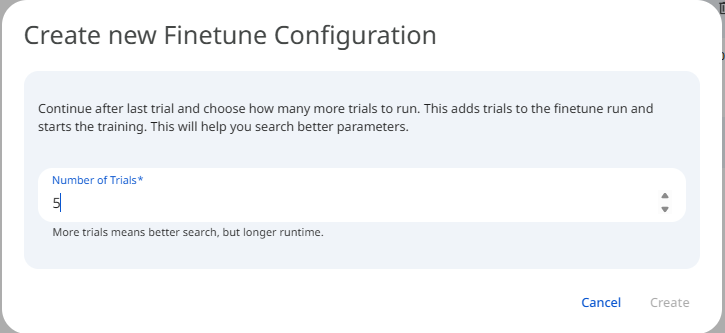 Snapshot of Protean AI Platform
Continue Fine-Tuning From a Specific Evaluation Point
Protean AI supports continuation fine-tuning, allowing training to resume from a specific evaluation snapshot with a new configuration. This creates a new training branch that builds on previously learned adapter weights.
What Changes
You may modify:
- Learning rate
- Epochs
- Batch size
- Regularization parameters
- Evaluation strategy
You may not change:
- Base model
- Dataset revision
- Adapter architecture
When to Use
Use continuation fine-tuning when:
- Initial training converged partially
- Additional learning is required
- You want to refine behavior without restarting
Examples:
- Lower learning rate for fine polishing
- Additional epochs after validation improvement
- Stabilizing a partially trained adapter
Result
- A new trial is created
- Training starts from selected evaluation snapshot
- Lineage links the new trial to its parent
See the screenshot below for an example of Continue Fine-Tuning From a Specific Evaluation Point.
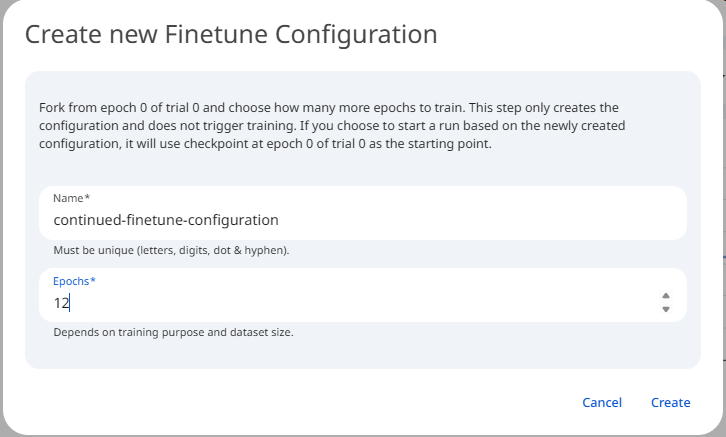 Snapshot of Protean AI Platform
Lineage and Traceability
All operations described above are fully tracked, so every clone, resume, retry, and continuation leaves a permanent record of where it came from.
Protean AI records:
- Parent-child relationships between runs and trials, so each branch can be traced back to the run or trial it grew from
- Snapshot origin for resumed or continued runs, identifying the exact saved point training restarted from
- Configuration deltas between branches, capturing which hyperparameters or settings changed from one attempt to the next
Because this history is captured automatically, every experiment stays auditable, reproducible, and easy to reason about. You can see exactly how each adapter evolved, repeat any run from its recorded inputs, and understand why one branch outperformed another.
Summary
Protean AI fine-tuning is designed for controlled evolution, not one-off runs.
| Operation | Purpose |
|---|---|
| Clone Configuration | Start fresh experiments |
| Resume Failed Trial | Recover from transient failures |
| Add New Trial | Retry cleanly |
| Add Trials | Compare multiple attempts |
| Continue From Snapshot | Incrementally refine learning |
These capabilities allow teams to iterate confidently, recover safely, and build production-grade adapters without losing insight or control.