Chunking
Chunking Strategies
Protean AI provides distinct chunking strategies to optimize how your text or file input is processed before vectorization. Selecting the right strategy and configuring its properties ensures the resulting embeddings are accurately tuned for your specific retrieval use case.
:::tip Choosing a Strategy
- Use Fixed Size for uniform, predictable data processing.
- Use Late Chunking to preserve context at chunk boundaries using overlap.
- Use Semantic Chunking for complex documents where preserving exact meaning and logical breaks is critical.
:::
Fixed Size Chunking
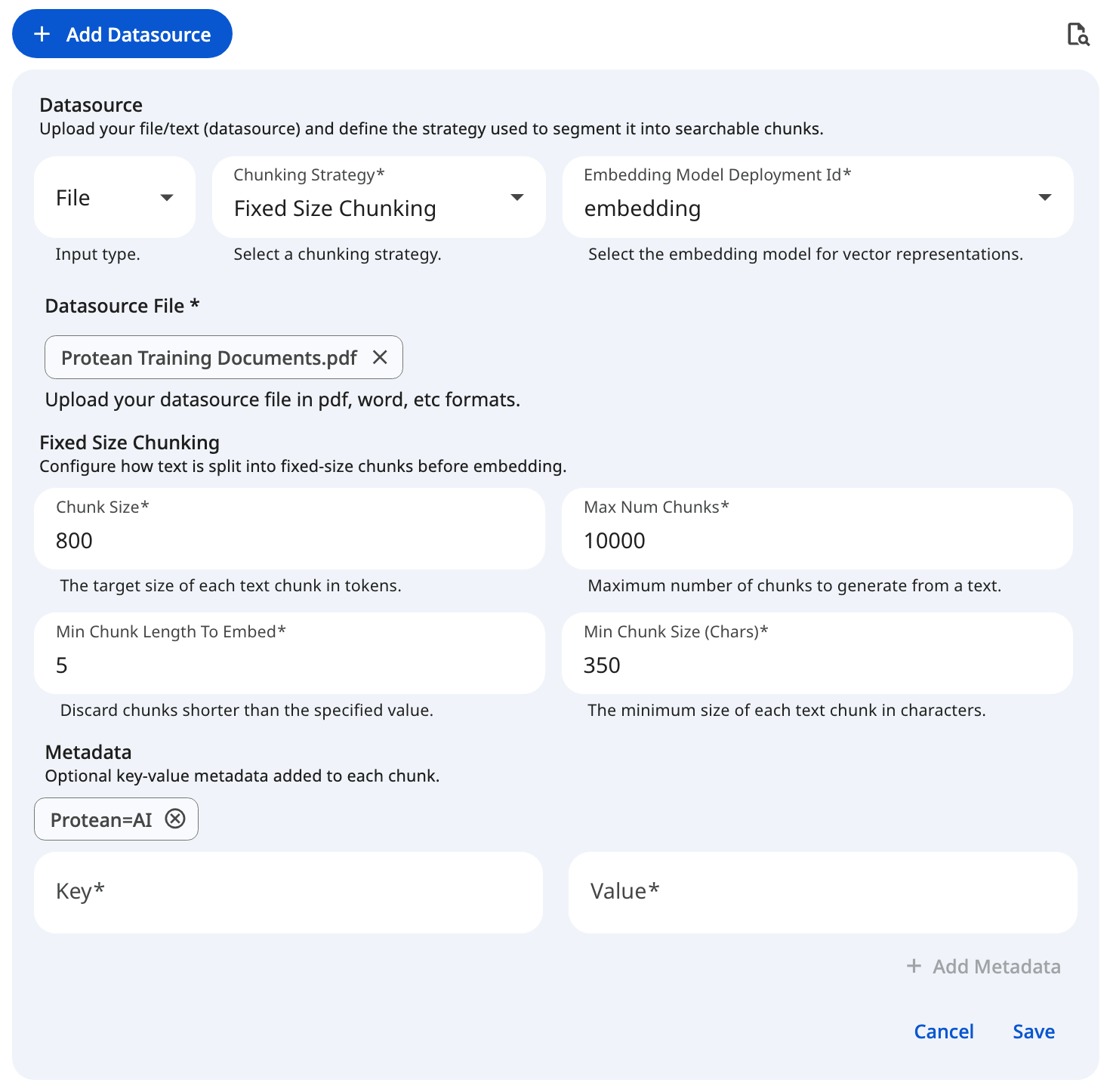
This strategy splits the input text into rigid, predefined sizes, regardless of natural sentence or paragraph boundaries. If no specific configuration is provided during ingestion, Fixed Size Chunking is utilized as the default fallback. It is highly predictable, computationally efficient, and serves as an excellent choice for uniform data processing where strict length constraints are required.
Configuration
Chunk Size
The target size of each text chunk, measured in tokens. This is the primary setting that dictates how much context is captured in a single block.
- Impact of Larger Values: Captures an expansive context but may dilute the specific information the AI needs. It also increases processing costs and risks exceeding the LLM's context window during retrieval.
- Impact of Smaller Values: Creates highly focused chunks but risks fragmenting the text, depriving the LLM of sufficient surrounding context to accurately interpret the meaning.
- Recommendation: A value between 512 and 1024 tokens typically provides the optimal balance of context and precision.
Maximum Number of Chunks
A safeguard setting that restricts the maximum number of chunks generated from a single text source.
- Impact of Higher Limits (or Uncapped): Risks overwhelming the vector database and consuming excessive compute resources if exceptionally large documents are ingested.
- Impact of Lower Limits: May artificially truncate standard documents, causing the system to ignore potentially critical information located later in the text.
- Recommendation: Set a reasonable upper bound (e.g., 5,000 to 10,000) based on anticipated file sizes to serve as a safety net.
Minimum Chunk Size
The absolute minimum size of each text chunk, measured in characters. If a generated chunk falls below this threshold (which often happens at the very end of a document), it is discarded.
- Impact of Larger Thresholds: Risks discarding valid, concise information, such as short summary paragraphs, single-sentence bullet points, or critical closing remarks.
- Impact of Smaller Thresholds: Permits noisy, meaningless fragments (e.g., isolated page numbers or section headers) to enter the dataset, potentially cluttering retrieval results.
- Recommendation: The default value of 350 characters is generally sufficient to filter out noise while retaining meaningful sentences. This field is labelled Min Chunk Size (Chars) in the form.
Minimum Chunk Length to Embed
The minimum length required for a chunk to be sent to the embedding model. This acts as a secondary filter to save compute resources.
- Impact of Larger Thresholds: Prevents the vectorization of short but highly relevant facts, rendering them invisible to semantic similarity searches.
- Impact of Smaller Thresholds: Wastes compute resources and API quotas by forcing the embedding model to process text fragments devoid of semantic value.
- Recommendation: The default value is 5 characters. Keep it low enough that short but meaningful chunks are still vectorized, while filtering out empty or near-empty fragments. This field is labelled Min Chunk Length To Embed in the form.
The Keep Separator, Generate Embeddings, and Embedding Model Deployment ID controls are not currently exposed in the datasource ingestion form. Embeddings are generated automatically using the knowledge set's configured default embedding model.
Metadata
Custom key-value pairs (<key, value>) used to annotate the document and its subsequent chunks. This metadata is embedded alongside the vector data and is crucial for enabling advanced filtering during full-text or similarity searches.
- Impact of Broad Tags: Using overly generalized tags (e.g.,
{"type": "document"}) provides minimal value for downstream filtering. - Impact of Granular Tags: Utilizing highly specific tags (e.g.,
{"department": "HR", "clearance_level": "2"}) empowers the search configuration to effectively isolate specific contexts during retrieval.
See the screenshot below for an example of Fixed Size Chunking Configuration for file datasource.
 Snapshot of Protean AI Platform
Create Chunk Questions
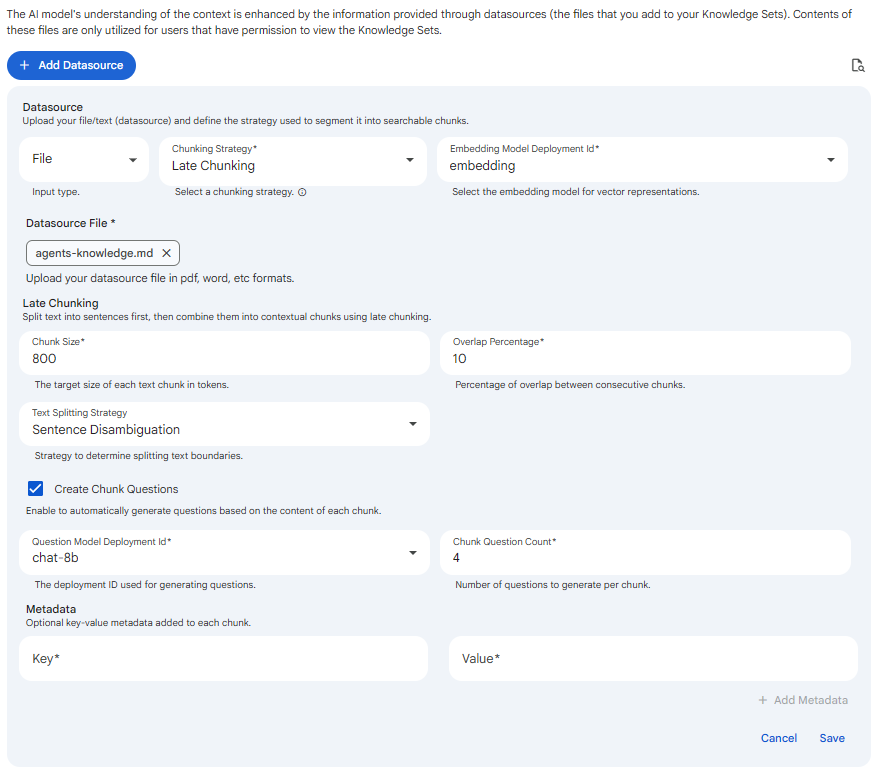
Create Chunk Questions is a shared option available on all three chunking strategies (Fixed Size, Late, and Semantic). It appears as a checkbox at the bottom of each chunking configuration, just above Metadata. When enabled, Protean AI generates a set of representative questions for every chunk produced by the selected strategy and stores them alongside the chunk. These questions give retrieval an additional, question-oriented matching signal that complements similarity over the raw chunk text.
Enabling the checkbox reveals two additional fields:
Question Model Deployment Id
The chat model deployment used to generate the questions for each chunk. The dropdown lists active chat deployments with at least one replica. This field is required once Create Chunk Questions is enabled.
Chunk Question Count
The number of questions to generate per chunk (minimum 1). Higher counts broaden the question coverage of each chunk at the cost of additional generation work during ingestion. This field is required once Create Chunk Questions is enabled.
Generating chunk questions only affects retrieval when the matching query also enables the Search in Questions toggle. See the Search in Questions section of the Search and Retrieval page.
 Snapshot of Protean AI Platform
Late Chunking
Late chunking focuses on context retention by splitting text based on defined structural boundaries (like sentences) while allowing for intentional overlap across macro chunks. This overlapping mechanism ensures that critical context is not lost at the chunk boundaries, providing highly coherent retrieval results for continuous prose.
Configuration
Chunk Size
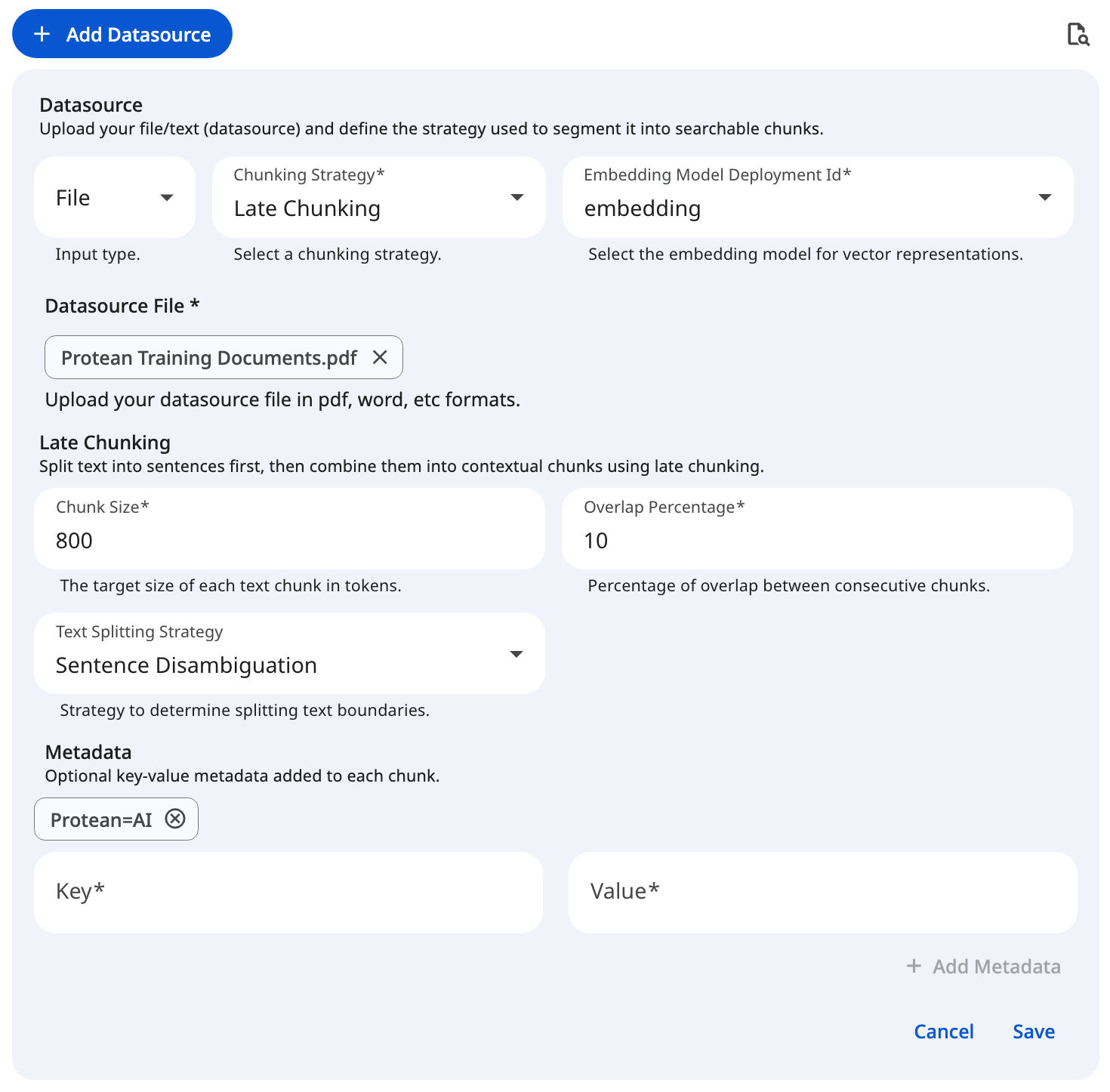
This dictates the number of tokens after which a chunk will be split. To prevent cutting off mid-thought, the system attempts to find a suitable punctuation break point (such as ., !, or ?) near this token limit.
- Impact of Larger Values: Captures an expansive context but may dilute specific facts. It also increases vector processing costs and risks exceeding the LLM's context window during the generation phase.
- Impact of Smaller Values: Creates highly granular chunks. Even with overlap applied, the core chunk may lack sufficient surrounding context for the LLM to accurately interpret the meaning.
- Recommendation: A target size between 512 and 1024 tokens is standard for most retrieval tasks, providing a solid balance of context and precision.
Overlap Percentage
This setting determines the amount of text that overlaps between adjacent macro chunks, defined as a percentage. Overlap acts as a bridge; by duplicating a small portion of the end of one chunk at the beginning of the next, you ensure the retrieval model grasps concepts that span across the split point.
- Impact of Higher Percentages: Significantly increases the total number of chunks and vector database storage requirements. It can also cause the LLM to process duplicate information, potentially degrading generation quality or artificially weighting repeated phrases.
- Impact of Lower Percentages (or 0%): Increases the risk of splitting a crucial sentence, entity, or thought in half, breaking the semantic context at the boundary.
- Recommendation: An overlap of 10% to 20% provides a safe bridge for context without excessive duplication.
Text Splitting Strategy
The foundational algorithm used to identify structural boundaries within the raw text before overlap is applied.
| Strategy | Description |
|---|---|
| Sentence Disambiguation | An advanced method that uses contextual rules to accurately identify true sentence boundaries. It intelligently prevents false splits that typically occur on common abbreviations (e.g., "Dr.", "e.g.", "Inc."). |
| Sentence Delimiter | A faster, strict-matching method that splits text purely based on standard punctuation marks (., !, ?). |
- Recommendation: Use Sentence Disambiguation for complex, professional, or academic documents where abbreviations are common. Opt for Sentence Delimiter for simpler text where processing speed is the primary concern.
The Late Chunking form exposes only Chunk Size, Overlap Percentage, and Text Splitting Strategy (plus the shared Create Chunk Questions and Metadata controls). There is no separate embedding model field; embeddings use the knowledge set's configured default embedding model.
Metadata
Custom key-value pairs (<key, value>) attached to the chunks to facilitate advanced downstream filtering and search capabilities.
- Impact of Broad Tags: Using overly generalized tags (e.g.,
{"type": "document"}) provides minimal value for downstream filtering. - Impact of Granular Tags: Utilizing highly specific tags (e.g.,
{"department": "HR", "clearance_level": "2"}) empowers the search configuration to effectively isolate specific contexts during retrieval.
See the screenshot below for an example of Late Chunking Configuration for file datasource.
 Snapshot of Protean AI Platform
Semantic Chunking
Semantic chunking is an advanced strategy that analyzes the underlying meaning of the text to determine the most logical splitting points. It evaluates how much the core topic shifts from one sentence to the next, guaranteeing that each resulting chunk represents a complete, cohesive thought.
:::note API Reference
If you are interacting with the Protean API directly, please note that the internal payload key for this specific configuration is sematicChunking.
:::
Configuration
Text Splitting Strategy
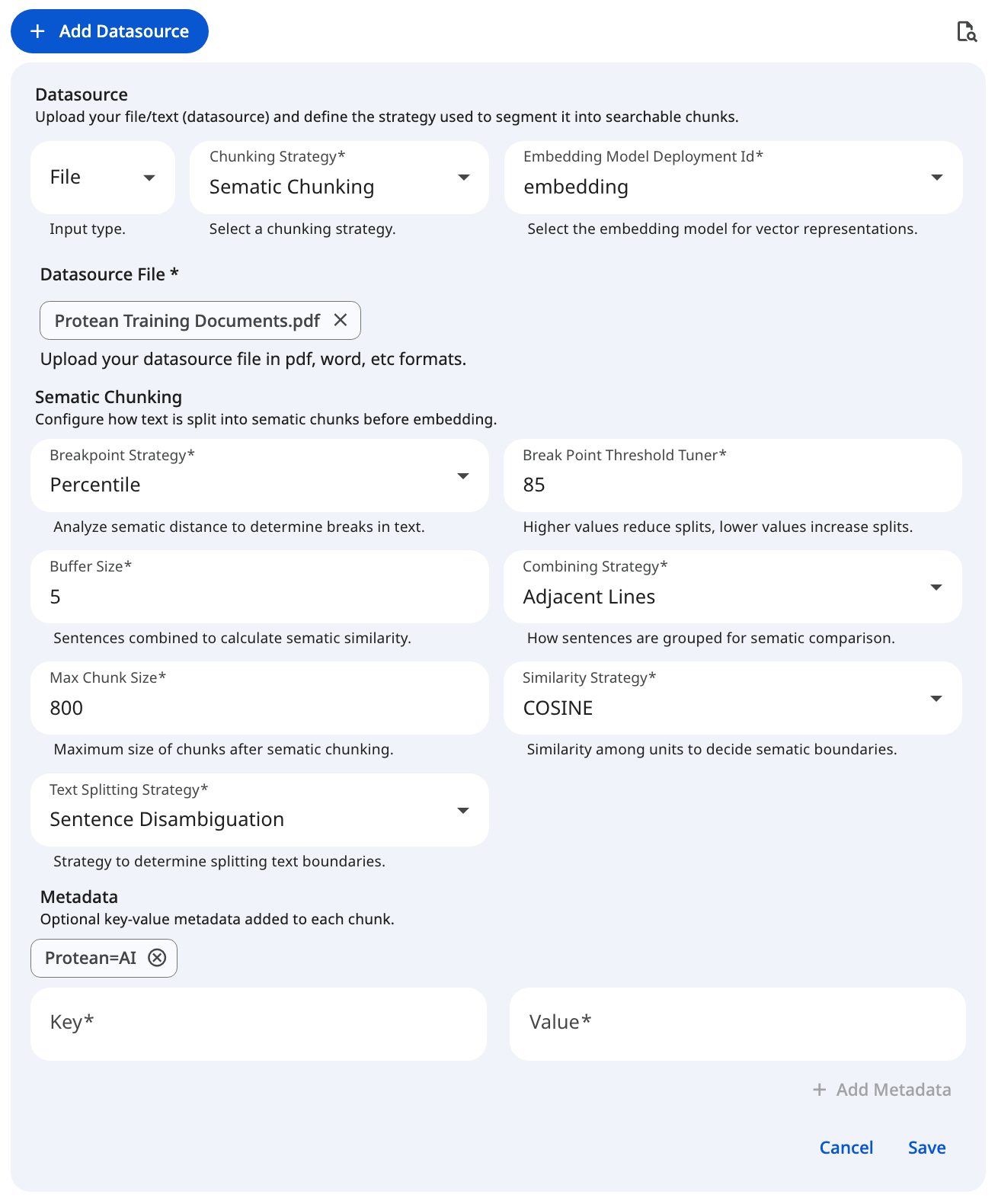
Before semantic analysis can begin, the text must be broken down into atomic units (sentences). This property determines how the input text is initially split.
| Strategy | Description |
|---|---|
| Sentence Disambiguation | Uses contextual rules to identify true sentence boundaries, preventing false splits on common abbreviations. Recommended for high accuracy. |
| Sentence Delimiter | Splits text strictly based on standard punctuation marks (., !, ?). |
- Recommendation: Use Sentence Disambiguation as the default for robust, accurate processing, especially for academic, legal, or professional documents.
Combining Strategy
Once the text is split into sentences, semantic chunking groups them into combined units for comparison. This property defines how those sentences are bundled together to form a comparative unit.
| Strategy | Description |
|---|---|
| Sliding Window | Groups sentences into overlapping windows, shifting gradually. This maintains a rolling context, ensuring smooth transitions during comparison. |
| Tumbling Window | Groups sentences into distinct, non-overlapping sequential blocks for straightforward, block-by-block comparison. |
| Adjacent Lines | Directly combines adjacent lines or sentences into a single unit, ideal for highly structured or line-break-heavy text. |
- Recommendation: The form defaults to Adjacent Lines, which works well for structured, line-break-heavy text. Switch to Sliding Window when you want a rolling evaluation of semantic drift across continuous prose.
Buffer Size
Works in tandem with the Combining Strategy. It specifies exactly how many sentences are combined together to form a single unit for semantic evaluation.
- Impact of Larger Values: Creates a smoother, broader context evaluation but may blur distinct, rapid shifts in topic, potentially missing logical break points.
- Impact of Smaller Values: Makes the system hyper-focused on immediate sentence-to-sentence changes, which might trigger false breaks on minor digressions within a single topic.
- Recommendation: A buffer of 1 to 3 sentences provides a highly reliable evaluation window.
Similarity Strategy
Determines the mathematical approach used to calculate the similarity score and distance to the subsequent combined unit.
| Strategy | Description |
|---|---|
| COSINE | Calculates the Cosine Similarity between the vector embeddings of the text units. This is the industry-standard method for measuring the semantic distance between two pieces of text. |
Breakpoint Strategy
Semantic chunking uses the distance scores calculated above to determine optimal boundaries. This property defines the statistical method for analyzing those distance values to pinpoint where a meaningful break in content has occurred.
| Strategy | Description |
|---|---|
| Percentile | Breaks the text when the semantic distance exceeds a specified percentile of all distances within the document. |
| Standard Deviation | Identifies breaks where the semantic distance deviates significantly from the mean by a certain number of standard deviations. |
| Interquartile | Uses the Interquartile Range (IQR) to detect statistical outliers in semantic distance, triggering a break at the outlier points. |
| Gradient | Analyzes the rate of change (gradient) between semantic distances to identify sharp, sudden shifts in the context. |
- Recommendation: Percentile is the most intuitive and widely applicable starting point for natural language documents.
Breakpoint Threshold Tuner
This crucial property controls the sensitivity of the chosen Breakpoint Strategy. It defines what constitutes a "significant enough" drop in similarity to qualify as a hard semantic boundary.
- Impact of Larger Values: Makes the system less sensitive. It requires a massive shift in topic to trigger a split, resulting in fewer, larger chunks that may inadvertently merge distinct concepts.
- Impact of Smaller Values: Makes the system highly sensitive. It splits the document at minor topic fluctuations, resulting in many smaller, highly specific chunks that may break apart cohesive thoughts.
- Recommendation: Start with the default value for your chosen strategy and adjust iteratively based on the output.
Percentile: 85.0Standard Deviation: 3.0Interquartile: 0.05Gradient: 95.0
Maximum Chunk Size
Even with semantic chunking, a long document might stay on the exact same topic for pages. If the resulting semantic chunk sizes grow too large for the embedding model to handle, they must be broken down further. This property dictates the maximum number of tokens allowed before forcing a split at the nearest suitable punctuation mark (., !, or ?).
- Impact of Larger Limits: Provides maximum leeway for semantic boundaries to form naturally but risks exceeding the LLM or embedding model's strict context window.
- Impact of Smaller Limits: Undermines the semantic algorithm by frequently forcing hard, artificial splits before the topic has naturally concluded.
- Recommendation: The form defaults to 800 tokens. Set this to the upper token limit of your specific embedding model (e.g., 8192 or 1024) when chunks should be allowed to grow larger.
The Generate Embeddings and Embedding Model Deployment ID controls are not exposed in the Semantic Chunking form. Embeddings are generated automatically using the knowledge set's configured default embedding model.
Metadata
Custom key-value pairs (<key, value>) attached to the chunks, enabling highly specific full-text and similarity search filtering.
- Impact of Broad Tags: Using overly generalized tags (e.g.,
{"type": "document"}) provides minimal value for downstream filtering. - Impact of Granular Tags: Utilizing highly specific tags (e.g.,
{"department": "HR", "clearance_level": "2"}) empowers the search configuration to effectively isolate specific contexts during retrieval.
See the screenshot below for an example of Semantic Chunking Configuration for file datasource.
 Snapshot of Protean AI Platform
Recommended Baseline Settings
The following values serve as a reliable starting point for configuring your dataset's ingestion pipeline. Tuning these properties helps balance retrieval accuracy with processing efficiency.
| Parameter | Applicable Strategy | Recommended Default | Adjustment Criteria |
|---|---|---|---|
| Chunk Size | Fixed, Late | '800' | Decrease if retrieval pulls too much irrelevant text; increase if the AI consistently lacks context. |
| Overlap Percentage | Late | 10 to 20 | Increase slightly if critical concepts are frequently getting cut in half at chunk boundaries. |
| Text Splitting Strategy | Late, Semantic | Sentence Disambiguation | Switch to Sentence Delimiter if processing speed is more critical than flawlessly handling complex abbreviations (like "Dr." or "e.g."). |
| Combining Strategy | Semantic | Adjacent Lines | Switch to Sliding Window for continuous prose where a rolling evaluation of semantic drift is preferable. |
| Breakpoint Strategy | Semantic | Percentile | Highly reliable standard. Switch to Standard Deviation if your text has a highly uniform, predictable structure. |
| Breakpoint Threshold Tuner | Semantic | 85.0 (for Percentile) | Increase to reduce the number of splits (resulting in larger chunks). Decrease to force more splits (smaller chunks). |
| Buffer Size | Semantic | 1 to 3 | Increase if semantic shifts in your documents happen gradually over several sentences rather than abruptly. |
| Minimum Chunk Size | Fixed | 350 characters | Increase if your dataset contains a lot of OCR noise, broken formatting, or useless 1-2 word lines. |