Knowledge set
Knowledge set is a centralized library for Retrieval-Augmented Generation (RAG) datasets in Protean AI. It enables teams to register, manage, and govern knowledge set sources. Users can input raw text or upload files, configure custom chunking strategies and properties, and convert their data into optimized, chunked sources ready for retrieval at inference time.
Knowledge set composes of Multiple Datasources, where each datasource originates from a user-uploaded file or direct text input. Users define specific chunking strategies and properties for each datasource. Based on these configurations, Protean AI extracts, chunks, vectorizes, and stores the resulting embeddings in the vector database.
Knowledge set provides the following key advantages:
- Centralized Management: Manage and govern all your knowledge set sources from a single, unified library.
- Configurable Data Processing: Tailor the ingestion and vectorization pipeline by defining custom chunking strategies and properties for both text and file inputs.
- Standardized Structure: Maintain consistent knowledge set format across all your RAG applications.
- Secure Access: Ensure data privacy and governance with robust, permission-based access controls.
- Agent Integration: Tightly integrate your knowledge set sources with AI agents for enhanced context and retrieval.
Configuration
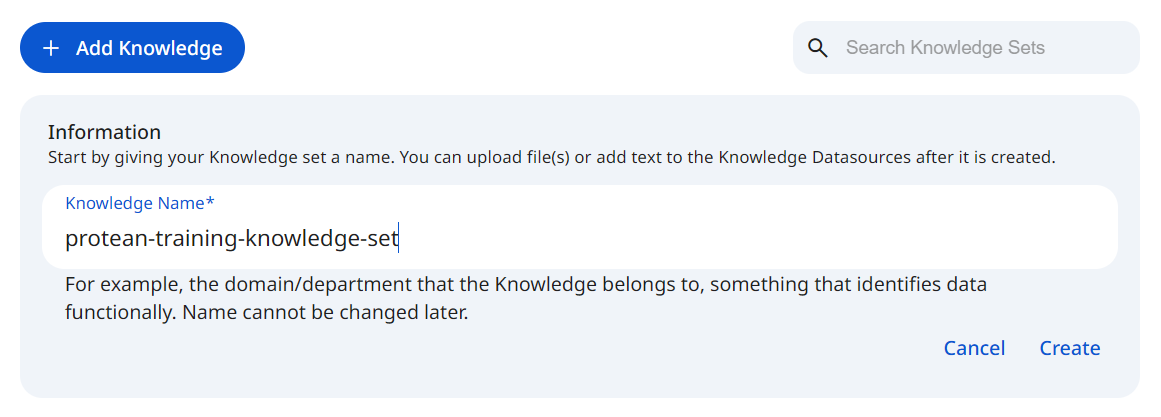
To register Knowledge set, the Knowledge set's identity must be configured. Once registered, datasources (files/raw text input) can be added to enrich the knowledge set.
See the screenshot below for an example of Knowledge set Configuration.
 Snapshot of Protean AI Platform
Knowledge set configuration includes:
- Knowledge set name
- One or more datasources
- Access control (RBAC)
Name
The knowledge set name is a unique identifier within Knowledge set. It is used to reference the knowledge set from agents. The name must be unique across all knowledge sets in the registry.
Datasources
A datasource is a foundational component of Knowledge set, originating from either an uploaded file or direct text input. By contributing its content to the knowledge set, each datasource expands the system's context. To ensure precise control and traceability, every datasource is processed independently using custom chunking configurations and tracked individually throughout its lifecycle.
Datasources are not restricted to text files. Protean AI also supports commonly used file formats like PDF, DOC/DOCX, PPT/PPTX, HTML. We are actively working on adding support for more file formats, including images, video and audio.
Add Datasource
When a datasource is added, Protean AI processes the input based on your configuration through the following steps:
- Content extraction – reads and parses the uploaded file or raw text input.
- Chunking – splits content into semantically meaningful chunks based on your selected strategy.
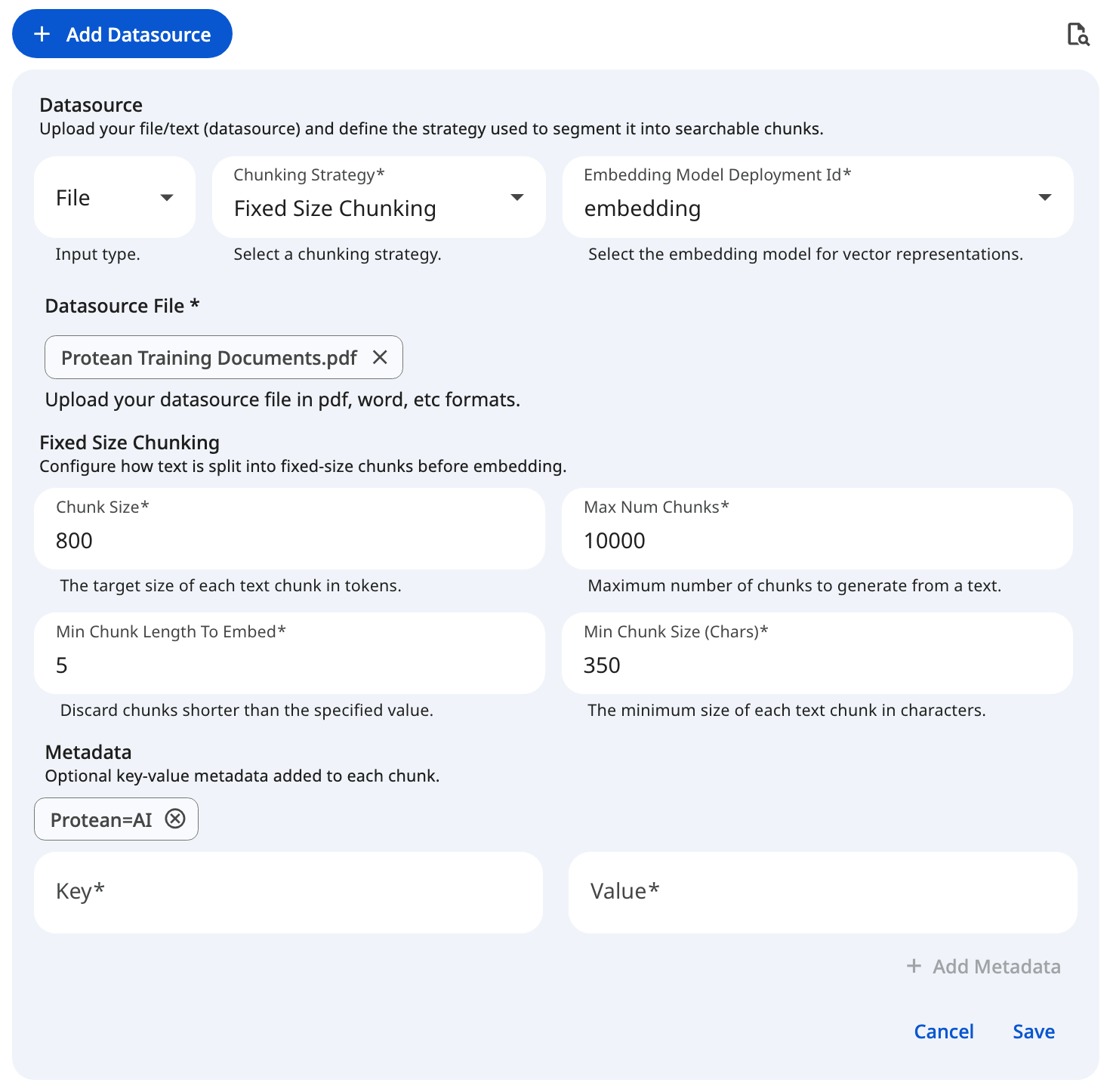
- Users select a specific chunking strategy and define its properties (e.g., chunk size and overlap).
- Content is split according to these custom parameters to optimize retrieval quality for your specific use case.
- Vectorization – converts chunks into embeddings.
A default embeddings model must be configured before adding datasources. We are working to expose selecting the embedding model while adding the datasource.
- Storage – persists embeddings in the vector database.
- Embeddings are securely stored for efficient retrieval.
- Metadata (source file, text offsets, etc.) is retained for full traceability.
This streamlined process applies your specific preprocessing configurations during ingestion, ensuring consistent and tailored retrieval behavior across your RAG applications.
See the screenshot below for an example of adding file datasource for a fixed size chunking configuration.
 Snapshot of Protean AI Platform
Datasource creation is only enabled when a default embedding model is configured and the user is authorized to add datasources to the knowledge set.
Chunking Strategies
Protean AI provides distinct chunking strategies to optimize how your text or file input is processed before vectorization. Selecting the right strategy and configuring its properties ensures the resulting embeddings are accurately tuned for your specific retrieval use case.
Fixed Size Chunking
This strategy splits the input text into rigid, predefined sizes, regardless of sentence or paragraph boundaries. It is highly predictable and computationally efficient, making it an excellent choice for uniform data processing where strict length constraints are required.
Late Chunking
Late chunking focuses on context retention by splitting text based on defined structural strategies (like sentences or tokens) while allowing for intentional overlap between adjacent chunks. This overlapping mechanism ensures that critical context is not lost at the boundaries, providing more coherent retrieval results for continuous prose.
Semantic Chunking
Semantic chunking analyzes the underlying meaning of the text to determine the most logical splitting points, ensuring that each resulting chunk represents a complete, cohesive thought or topic. This advanced strategy is ideal for complex, unstructured documents where preserving exact semantic meaning and logical flow is critical for high-quality AI retrieval.
For a detailed breakdown of the various chunking strategies and their application, please see the Chunking Strategies page.
Listing
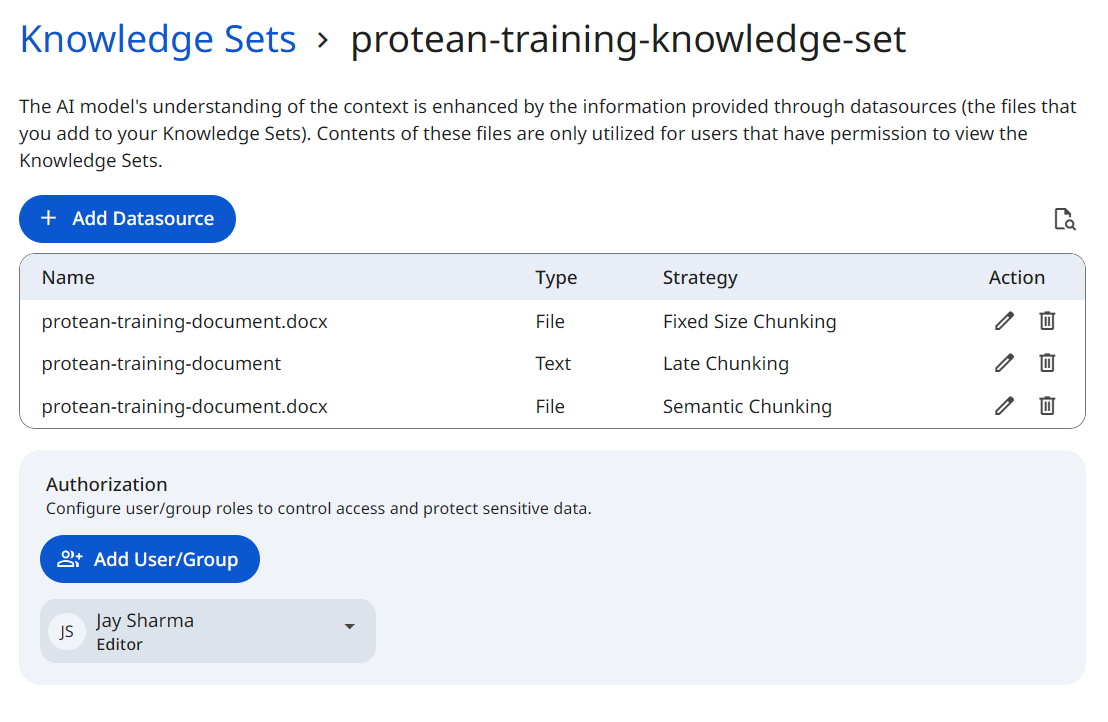
Each datasource is displayed as an individual entry within the knowledge set. The listing provides a comprehensive overview of your knowledge set sources, including:
- Name: The uploaded file name, or the custom name provided for a text datasource.
- Type: Indicates whether the datasource origin is a
FILEor rawTEXT. - Chunking Strategy: Displays the specific strategy used to process the datasource (e.g., Fixed, Late, or Semantic).
- Actions: Authorized users can View, Edit, or Delete the datasource. Deleting a datasource immediately removes its content and embeddings from the knowledge set and vector database, updating retrieval results instantly.
The Type reflects the format of the inputted datasource. Protean AI currently supports FILE and TEXT datasources. Support for additional integrations and datasource types will be added in future releases.
See the screenshot below for an example of knowledge set listing.
 Snapshot of Protean AI Platform
Datasources are processed synchronously. If you reload or navigate away from the knowledge set page during ingestion, the datasource processing will be interrupted and will not complete.
Edit
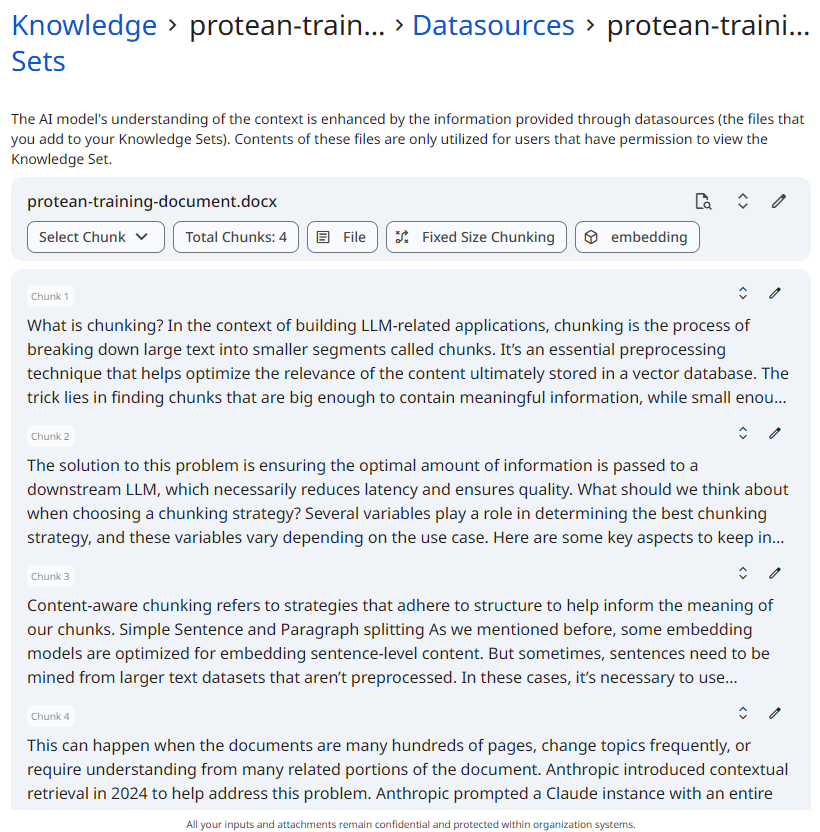
Selecting the Edit action opens the detailed profile of a specific datasource. This interface provides granular control over the ingested data and its properties after the initial processing is complete.
From the datasource detail view, you can perform the following actions:
- Review and Edit Chunks: Manually inspect the individual text chunks generated by your selected strategy. You can directly edit the text of a chunk to fix formatting issues, adjust boundaries, or remove irrelevant fragments, ensuring pristine retrieval quality.
- Manage Metadata: Add, update, or remove custom key-value pairs associated with the datasource or its specific chunks. This is crucial for refining downstream filtering and categorization.
- Apply Search Parameters: Test and tweak search configurations directly against the datasource's vector embeddings to evaluate how effectively its chunks will be retrieved during inference.
See the screenshot below for an example of chunked datasource.
 Snapshot of Protean AI Platform
Delete
Deleting a datasource removes the uploaded file from the knowledge set and permanently deletes all derived chunks and embeddings from the vector database. The operation is scoped to the selected datasource only and does not impact other datasources within the knowledge set. Once deleted, the datasource's content is immediately excluded from all retrieval and RAG query results.
Search & Retrieval
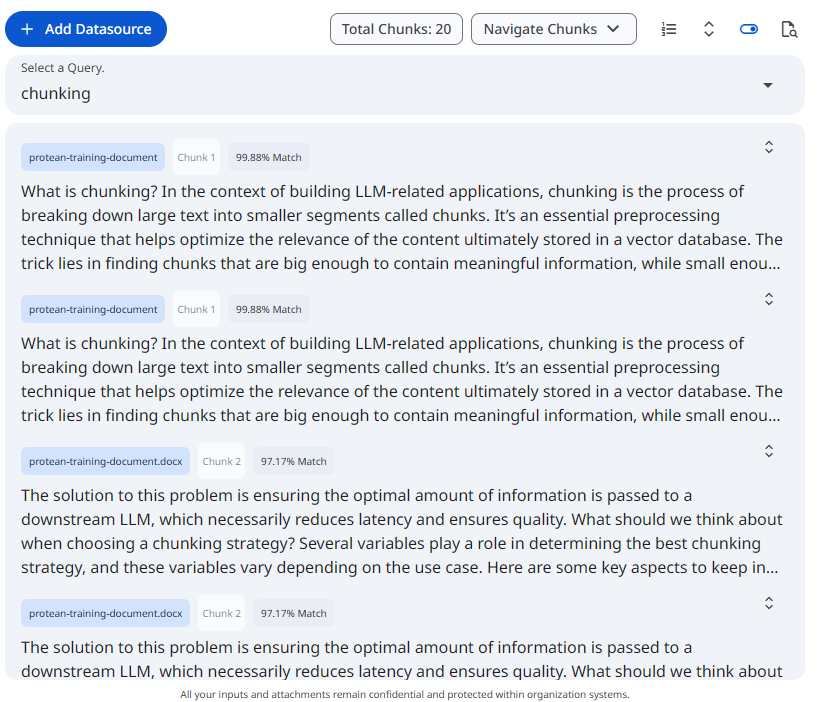
Protean AI allows you to test your retrieval configurations directly within the UI to ensure your chunking and embedding strategies are effective. You can evaluate your data at two distinct scopes:
- Dataset-Level Search: Accessible from the main dataset listing. This operation searches across all datasources within the selected dataset. It helps you evaluate how well the combined, overarching knowledge set base responds to a user's query and whether different datasources are conflicting or complementing each other.
- Datasource-Level Search: Accessible within the View/Edit profile of a specific datasource. This scopes the search exclusively to the chunks of that single file or text input. It is highly useful for isolating a problematic document and fine-tuning its specific retrieval performance without interference from the rest of the dataset.
For a detailed breakdown of the search parameters, algorithms, and filtering options available, please see the Search and Retrieval page.
See the screenshot below for an example of search and retrieval on a knowledge set.
 Snapshot of Protean AI Platform
Access Control
Access Control in Protean AI governs who can view, create, modify, and operate resources across the platform. It is designed for enterprise environments where security, isolation, and governance are mandatory.
Protean AI follows a principle of least privilege, ensuring users and systems are granted only the permissions required to perform their tasks.
| Role→ Action↓ | Admin | Model Admin | User | Owner | Viewer | Description |
|---|---|---|---|---|---|---|
| Create | Yes | Yes | Yes | NA | NA | Register Knowledge set |
| Read | Yes | No | No | Yes | Yes | View knowledge set and datasources. Use datasources from the knowledge set in inferencing |
| Update | Yes | No | No | Yes | No | Update knowledge set metadata, add and remove datasources |
| Delete | Yes | No | No | Yes | No | Remove dataaset, its underlying datasource and embeddings |
| Manage Access | Yes | No | No | Yes | No | Grant or revoke permissions for users and groups. |
- Datasource contents are only used for users with permission to view the knowledge set
- Unauthorized users cannot retrieve or infer knowledge set from knowledge sets that they do not have access to
Workflow
- Create Knowledge Set
- Configure default embedding (and optionally reranking) model
- Upload one or more datasources
- Wait for ingestion and vectorization to complete
- Use the knowledge set in agents
Result
After registration and datasource ingestion, the Knowledge set becomes a searchable, governed knowledge set base. It can be safely reused across applications, agents, and environments while maintaining security, traceability, and retrieval quality.
Knowledge set turns raw files into production-grade retrieval infrastructure.