Memory Preferences
Memory Preferences control what information the system is allowed to extract from your conversations. Protean can learn facts about you over time and reuse them to make later conversations more relevant. This tab lets you decide which of those facts it may extract and which it should leave alone.
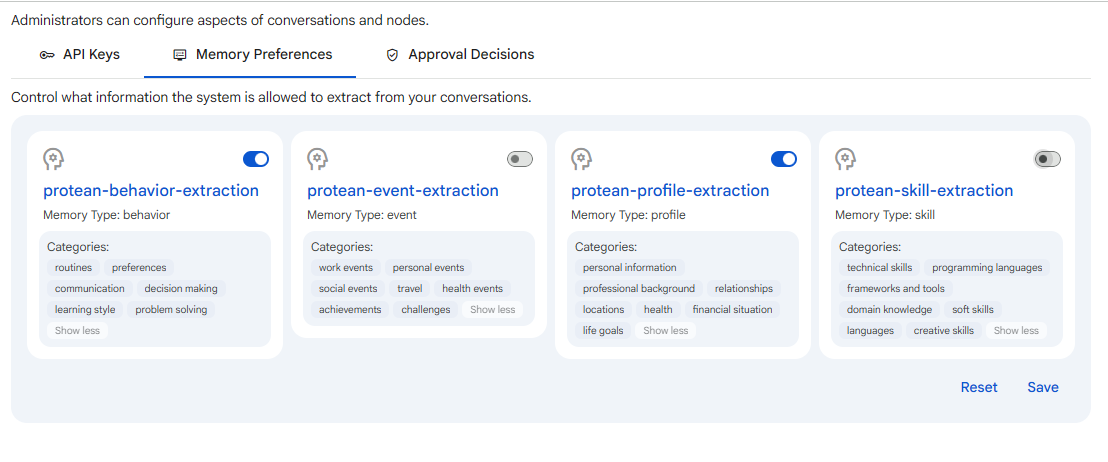 Snapshot of Protean AI Platform
This tab appears only if you are allowed to update memory settings. If you do not see it, your account does not currently have that permission.
How extraction settings work
The tab lists each fact type the system can extract, one card per type, for example protean-behavior, event, profile, and skill-extraction. Each card describes a different slice of what Protean may learn: behavioural patterns, things that happened, durable details about you, and skills inferred from how you work. Each card shows:
- Name: the fact type, naming the kind of detail it captures so you know exactly what you are allowing or blocking.
- Memory Type: the category of memory the fact belongs to, which tells you how the system files and reuses it later.
- Categories: the tags grouped under that fact type, or a note that none are added, so you can see the finer-grained labels that fall under the type.
- A toggle: whether the system is allowed to extract this fact from your conversations.
Turn a toggle on to allow extraction of that fact type, or off to opt out. Turning a card off opts you out of that fact type entirely, telling the system not to extract anything of that kind from your conversations going forward. This matters because it puts you in direct control of what Protean remembers about you, so you can keep useful recall switched on while excluding categories you would rather it never capture.
Selecting a card opens the matching fact settings in a new tab, so you can see the full definition of what that fact captures before deciding whether to allow it.
Saving your choices
Your changes are not applied until you save:
- Save: stores your current toggles. While saving, the page shows an "Updating Preferences" notice; do not reload or refresh until it finishes.
- Reset: discards unsaved changes and reloads the settings as they were last stored.
Under the hood, saving records the fact types you turned off as an opt-out list, and leaves the rest enabled. Facts you never touched stay at their default, which is enabled.
If there are no extraction settings to configure, the tab says so instead of showing cards.