Settings
The Settings area collects the personal controls that apply to you as a user rather than to a single resource. You reach it from the Settings section of the left sidebar, which expands into a submenu listing the areas below. Settings is where you manage how applications authenticate as you, what the system is allowed to remember about you, and the standing decisions that govern tool calls in your conversations.
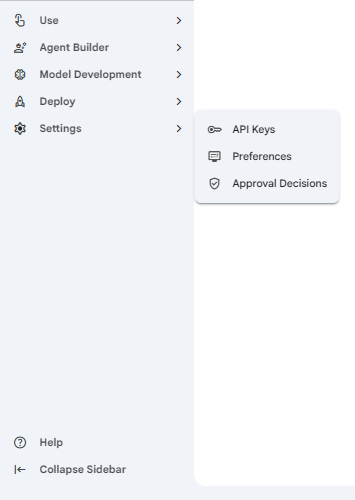 Snapshot of Protean AI Platform
Settings holds three areas:
- API Keys: tokens that let an application call the Protean API on your behalf. You generate them here so external tools and scripts can act as you, and you revoke them here when an application no longer needs access or a token may have leaked, which matters because each token carries your full API access.
- Preferences: the memory controls that decide what information the system is allowed to extract from your conversations. You toggle each fact type on or off here, which lets you opt out of capturing details you would rather not have remembered, so you stay in control of what Protean learns about you over time.
- Approval Decisions: the saved approvals and denials that govern whether an agent may run a tool without prompting you again. You review, edit, and remove them here, which is how you manage the standing rules created from the in-conversation tool call approval prompts, so trusted tools run smoothly and risky ones keep asking.
Which tabs you see depends on your permissions. The API Keys tab appears only if you are allowed to create API keys, and the Memory Preferences tab appears only if you are allowed to update memory settings. The Approval Decisions tab is always available.
Each tab keeps its place in the address bar, so you can link straight to a tab. The API Keys tab is the default, with Memory Preferences and Approval Decisions as the other two.
API Keys
An API key is a token that lets an application call the Protean API on your behalf. Generate a separate key for each application that needs access, so that you can revoke one without affecting the others.
Memory Preferences
Memory Preferences control what information the system is allowed to extract from your conversations. Protean can learn facts about you over time and reuse them to make later conversations more relevant. This tab lets you decide which of those facts it may extract and which it should leave alone.
Approval Decisions
Some agents can call tools through their MCP servers, and some of those tools are configured to require your approval before they run. When that happens during a conversation, the agent pauses and asks you to decide. It can also pause to ask you a clarifying question when it needs more information before continuing.