Model
The Model segment binds the agent to a deployed model and tunes how that model generates responses. Several options here depend on each other or on the chosen model. The conditions table at the end summarises them.
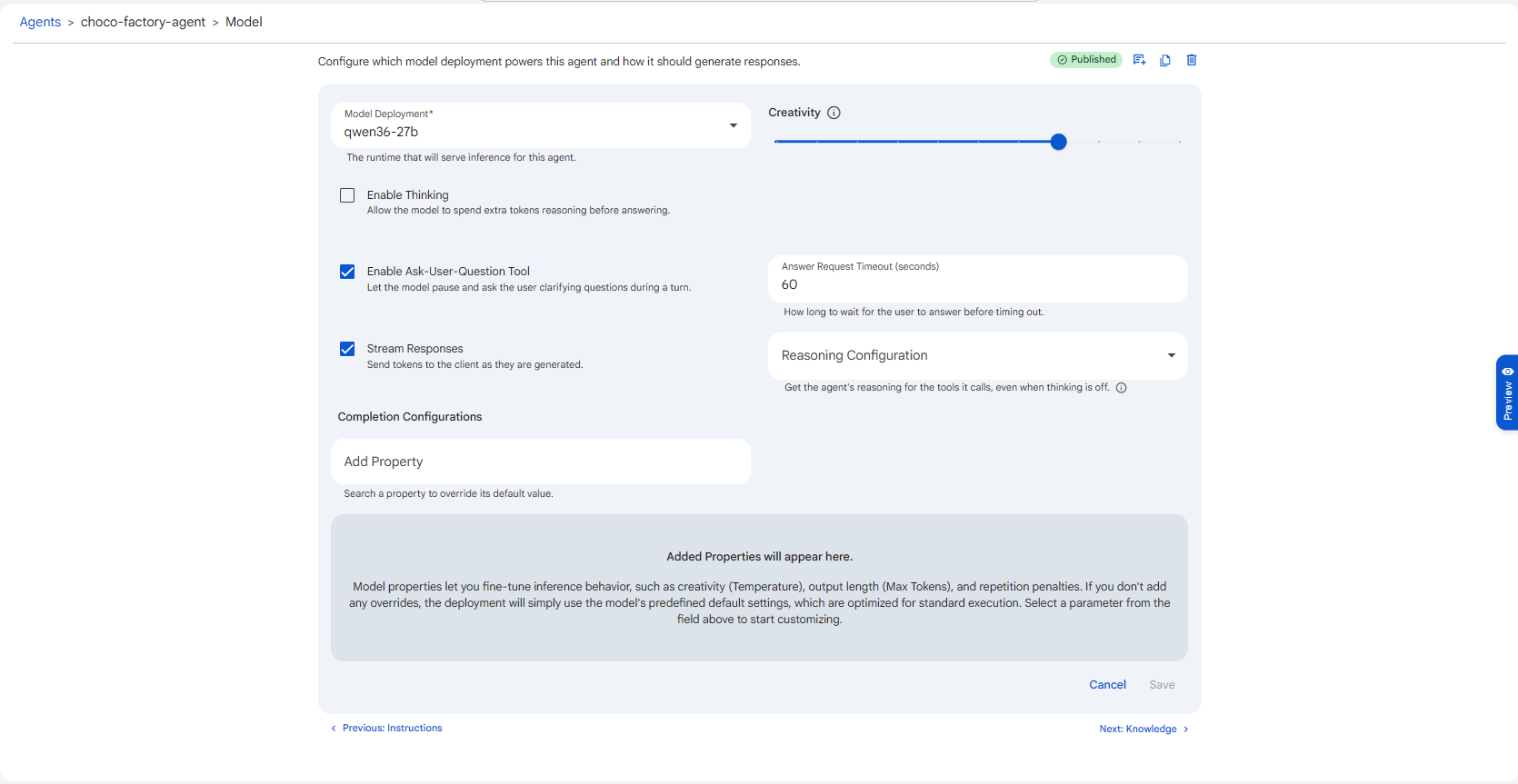 Snapshot of Protean AI Platform
Model Deployment
The runtime that serves inference for this agent. Only deployed, compatible models appear in this dropdown. If the model you want is missing, deploy it first (see Model Deployment).
The chosen deployment is the foundation for everything else on this page. It determines the agent's reasoning quality, context-window size, and which features are even available. If a model does not support a feature, the related option is disabled automatically to prevent misconfiguration. For example:
- A model without tool-calling support disables MCP tools and tool-based skills.
- A model without extended-thinking support disables Enable Thinking.
Creativity
A slider from 0 to 1 controlling the randomness of the model's output.
- Lower values (near 0) make responses more deterministic and repeatable, the same prompt tends to produce the same answer. Best for code, SQL, data extraction, and structured output where precision matters.
- Higher values (near 1) increase variety and expressiveness. Best for brainstorming, drafting, and creative writing.
If you are unsure, keep it moderate. Raise it only when you specifically want more varied phrasing.
Enable Thinking
When enabled, the model spends extra tokens reasoning internally before it answers. This improves quality on complex, multi-step problems, at the cost of higher latency and token usage. Enable it when answer quality on hard problems matters more than speed, and leave it off for simple or latency-sensitive tasks where the extra reasoning adds little.
Condition: only available on models that support extended thinking. Otherwise the option is disabled.
When you turn it on, a thinking budget appears, controlling how much effort the model spends reasoning:
| Budget | When to use |
|---|---|
| Hard | Default. Balanced reasoning suitable for most tasks. |
| Harder | Deeper reasoning for genuinely complex problems. |
| Hardest | Maximum reasoning effort; highest latency and cost. Reserve for the hardest cases. |
Enable Ask-User-Question Tool
When enabled, the model may pause mid-turn and ask the user a clarifying question instead of guessing when information is missing or ambiguous. This raises answer accuracy on under-specified requests because the agent gathers the missing detail rather than committing to an assumption, at the cost of an extra round trip with the user.
Condition: turning this on reveals an Answer Request Timeout (seconds) field, which sets how long the agent waits for the user's answer before timing out. Leave it empty to use the server default.
The Answer Request Timeout is measured in seconds. Don't confuse it with the MCP Approval expiry time (also in seconds) or an MCP server's own connection timeout (in milliseconds). Always read the unit printed beside the field.
Stream Responses
When enabled (the default), tokens are sent to the client as they are generated, giving the responsive, word-by-word chat experience.
Condition: enabling Evaluation forces streaming off, and the two cannot both be on. Because an evaluated response must be fully generated before it can be graded, an evaluated agent cannot stream. If a streaming experience matters more than automatic scoring, leave evaluation off.
Reasoning Configuration
A dropdown that adds structured reasoning steps and exposes the agent's reasoning for the tools it calls, even when Thinking is off. It makes the agent's decision-making more transparent and auditable, which helps you understand and trust why it acted as it did. Any combination of the following can be selected:
| Option | Effect |
|---|---|
| Intent Classification | The agent first classifies the user's intent before acting. |
| Reasoning Trace | The agent produces an explicit trace of its reasoning steps. |
| Tool Justification | The agent explains why it selected a particular tool before calling it. |
These are independent of Enable Thinking: Thinking controls the model's internal deliberation, while Reasoning Configuration controls what structured reasoning is surfaced around tool use.
Completion Configurations
Advanced, optional overrides for low-level inference parameters such as Max Tokens (output length) or repetition penalties. Use Add Property to search for a parameter and override its default value; added properties are listed below the field.
If you add nothing, the deployment uses the model's predefined defaults, which are optimised for standard execution and are the right choice for most agents. Only override a property when you have a specific reason to.
Conditions & Dependencies
| Setting | Depends on |
|---|---|
| Enable Thinking (and budget) | Available only if the selected model supports extended thinking. Budget appears only when Thinking is on. |
| Answer Request Timeout | Appears only when Enable Ask-User-Question Tool is on. |
| Stream Responses | Forced off when Evaluation is enabled. |
| MCP tools / tool-based skills | Available only if the model supports tool calling. |
| Saving Instructions | Requires a model to be selected and saved first. |