General
The General segment holds the agent's identity. It is also the form you fill in when you first create an agent.
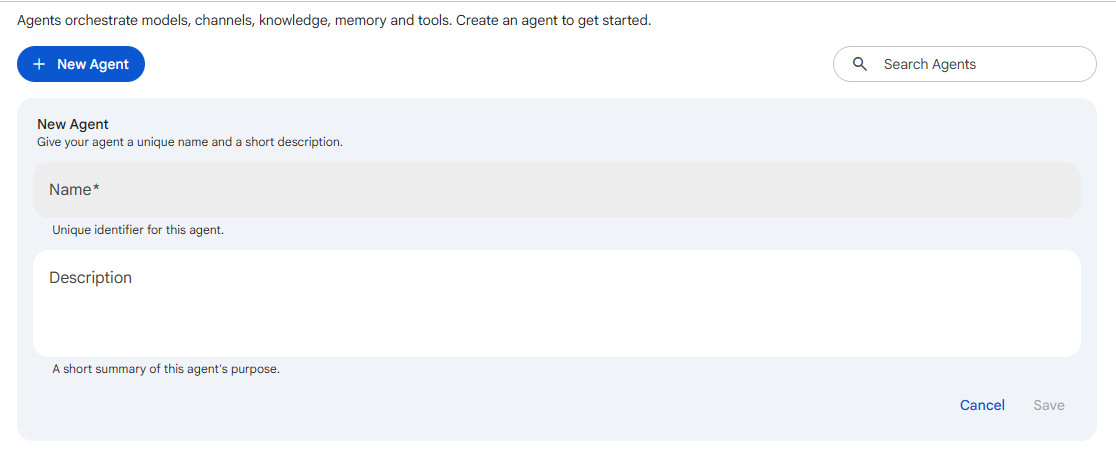 Snapshot of Protean AI Platform
Each configuration segment is saved on its own. The Save button on a segment is enabled only when you have unsaved, valid changes. Use Previous / Next at the bottom of each segment to move through the configuration.
Name
The agent name is a unique identifier used throughout the platform and as part of the deployment address. Because it is used as a technical identifier, it follows a strict format:
- Lowercase letters, digits, hyphens, and dots only
- Must start and end with a letter or digit
- Between 3 and 40 characters
| Valid | Invalid |
|---|---|
customer-support | Customer Support (spaces, uppercase) |
choco-factory-agent | -helper (leading hyphen) |
sales.assistant | qa (too short) |
The name is set when the agent is created. Because it is part of the agent's address, it is fixed for the life of that agent; to use a different name, clone the agent under the new name.
Pick a name that reflects the agent's role. A clear name makes the agent easy to find and reference, but the name does not influence behaviour; that is what Instructions are for.
Description
A short, optional summary of the agent's purpose (up to 250 characters). It is shown on the agent's card in the list to help people understand what the agent does. The description is metadata only; it does not affect the agent's behaviour or responses.