Agents
An Agent in Protean AI is a configurable, deployable AI execution unit that combines a deployed model, instructions, knowledge, memory, tools, and communication channels into a single governed artifact.
Where a raw model only predicts the next token, an Agent encapsulates intent, constraints, and execution context. Instead of re-prompting and re-wiring a model for every interaction, you define the behaviour once and reuse it across conversations, applications, and teams.
Agents are first-class resources: they can be published, versioned, deployed onto a node pool, shared, and governed with enterprise-grade access control.
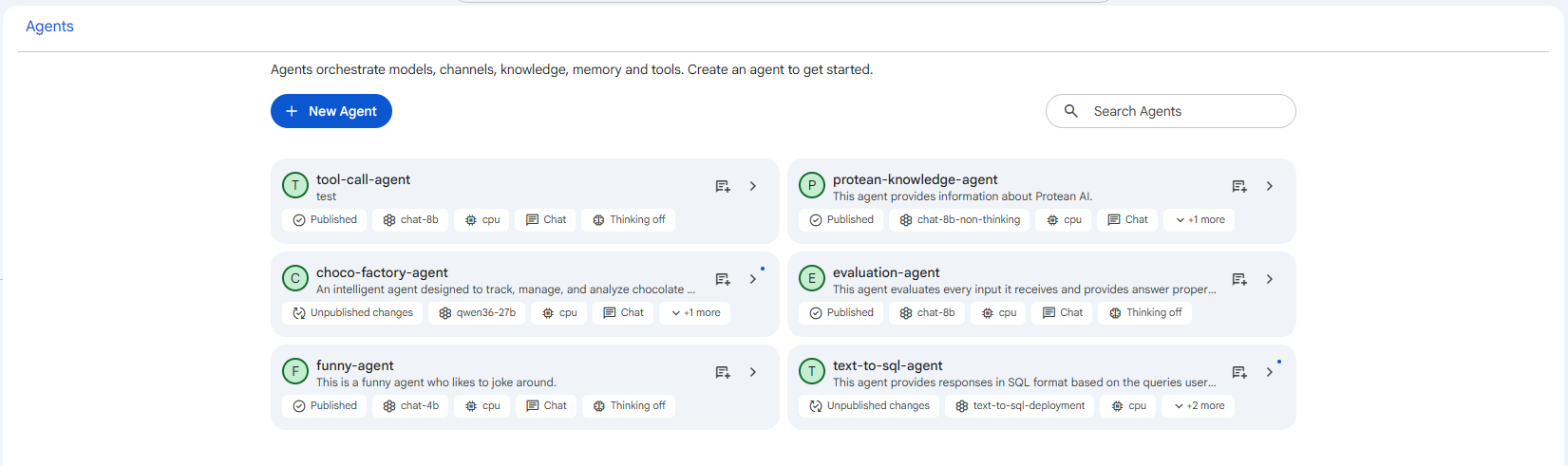 Snapshot of Protean AI Platform
Agents provide the following advantages:
- Encapsulate model behaviour, instructions, and runtime configuration in a single artifact
- Produce repeatable, consistent AI behaviour across users and applications
- Combine models, knowledge, memory, skills, and MCP tools without application-level wiring
- Support a controlled draft → publish → revision lifecycle with full auditability
- Expose the agent through multiple channels (interactive chat, MCP) from one definition
Core Concepts
Before configuring an Agent, it helps to understand three building blocks.
Agent
The Agent is the top-level resource. It has a name, a description, and a lifecycle status, and it bundles everything below: instructions, model, knowledge, memory, skills, MCP tools, channels, and evaluation, plus any sub-agents. It is deployed onto a node pool and, once published, can serve conversations.
Agent & Sub-Agents
Every Agent has a primary behaviour definition, its instructions, model, knowledge, memory, skills, MCP tools, channels, and evaluation. This is simply referred to as the agent.
An Agent can also contain sub-agents: specialised units the agent delegates to, each with its own model, instructions, and tools. A sub-agent is configured exactly like the agent itself. See Sub-Agents.
A sub-agent is a full, independent behaviour definition. The only thing it cannot contain is another layer of sub-agents, delegation is one level deep.
Deployment
A published Agent is deployed onto a node pool, which provisions the runtime that serves requests. An agent is only usable in chat once its deployment is created and has at least one available replica. See Deploy & Auth.
Configuration Overview
An Agent's behaviour is configured through a set of segments, each covered by its own page:
| Segment | Purpose |
|---|---|
| General | Name and description |
| Channels | How the agent is reached (Chat, MCP) |
| Instructions | The system prompt that governs behaviour |
| Model | Deployed model, creativity, thinking, reasoning |
| Knowledge | Knowledge sets the agent searches to ground answers |
| Memory | Conversation and long-term memory |
| Skills | Built-in capabilities (knowledge search, ask-user) |
| MCP Servers | External tools the agent may call |
| Evaluation | Automatic scoring of the agent's responses |
| Sub-Agents | Specialised units the agent delegates to |
| Deploy & Auth | Runtime deployment and access control |
Lifecycle at a Glance
Agents follow a controlled lifecycle to support safe iteration and governance:
| Status | Meaning |
|---|---|
| Draft | Editable; not yet usable by others |
| Published | Immutable, deployed, and serving conversations |
| Archived | Superseded by a newer revision; preserved for audit |
| Obsoleted | No longer in use |
Editing a published agent creates a new draft revision that points back at the published version. Publishing the draft promotes it, leaving the previous version intact for auditability. See Lifecycle & Publishing.
Access Control
Access Control governs who can view, create, modify, publish, and operate Agents. Protean AI follows the principle of least privilege. See Access Control for the full role/action matrix.
Workflow
- Create a new Agent (name + description).
- Write instructions, the system prompt that defines the agent's role and boundaries.
- Select a model and tune creativity, thinking, and reasoning options.
- Attach knowledge, memory, skills, and MCP tools as needed.
- Enable channels (Chat and/or MCP).
- Deploy the agent to a node pool and save & test it.
- Publish the agent so it can be shared and used across teams.
General
The General segment holds the agent's identity. It is also the form you fill in when you first create an agent.
Channels
Channels define how an agent receives requests and delivers results. The segment is split into two directions:
Instructions
Instructions define the system prompt for the agent, how this agent behaves: what it should do, how it should respond, and the rules it must follow. This is the single most important lever for controlling behaviour, and everything the agent does is shaped by what you write here.
Model
The Model segment binds the agent to a deployed model and tunes how that model generates responses. Several options here depend on each other or on the chosen model. The conditions table at the end summarises them.
Knowledge
Knowledge lets an agent ground its answers in your data. You connect one or more knowledge sets (datasets), and at inference time the agent retrieves the most relevant chunks from them and uses those as context, a retrieval-augmented generation (RAG) pattern. This keeps responses accurate and current without baking the information into the model.
Memory
Memory gives an agent continuity. Without it, every request is stateless and the agent only sees the current message. With memory, the agent recalls recent turns and, optionally, retains durable summaries and facts across conversations.
Skills
Skills are reusable building blocks (prompts and tools packaged together) that the agent can invoke. Unlike MCP servers (which you register yourself), skills ship with the platform. You add one by searching the Available Skills list and moving it into Selected Skills; each skill then exposes its own configuration.
MCP Servers
Tools are provided by MCP (Model Context Protocol) servers. In this segment you pick the servers whose tools the agent is allowed to call during a conversation, choose how tool calls are approved, and set execution limits.
Evaluation
Evaluation runs scoring passes on the agent's responses. A separate evaluator model grades each response against a rubric you define, so you can monitor quality and catch regressions automatically. The segment has two tabs: Prompt and Settings.
Sub-Agents
A sub-agent is a specialised unit that handles a specific task on behalf of the main agent. Sub-agents let you decompose a complex agent into focused parts, each with its own model, instructions, skills, memory, and knowledge, instead of forcing one prompt and one model to do everything.
Deploy & Auth
The Deploy & Auth segment manages the agent's runtime deployment and controls who can view or update it. It always applies to the main agent: sub-agents do not have their own deployment or access control.
Preview
Preview lets you chat with the agent without leaving the configuration screen. It is the fastest way to test the effect of a change, adjust the instructions, model, knowledge, or tools, then immediately try a message and see how the agent responds.
Lifecycle & Publishing
Agents are governed resources. They move through a controlled lifecycle so that anyone using an agent gets stable, predictable behaviour while you keep iterating safely. This page covers agent status, the draft → publish → revision flow, and how to use a published agent in chat.
Access Control
Access Control governs who can view, create, modify, publish, and operate Agents. It is designed for enterprise environments where security, isolation, and governance are mandatory.