Administration
Administration (Admin Settings) is where platform administrators configure the organization-wide defaults that the rest of Protean falls back to when a conversation, workspace, or agent does not specify its own value. It is reached from the Admin item in the sidebar and lives at the /admin-settings route. Opening Admin Settings lands on the Default Models tab.
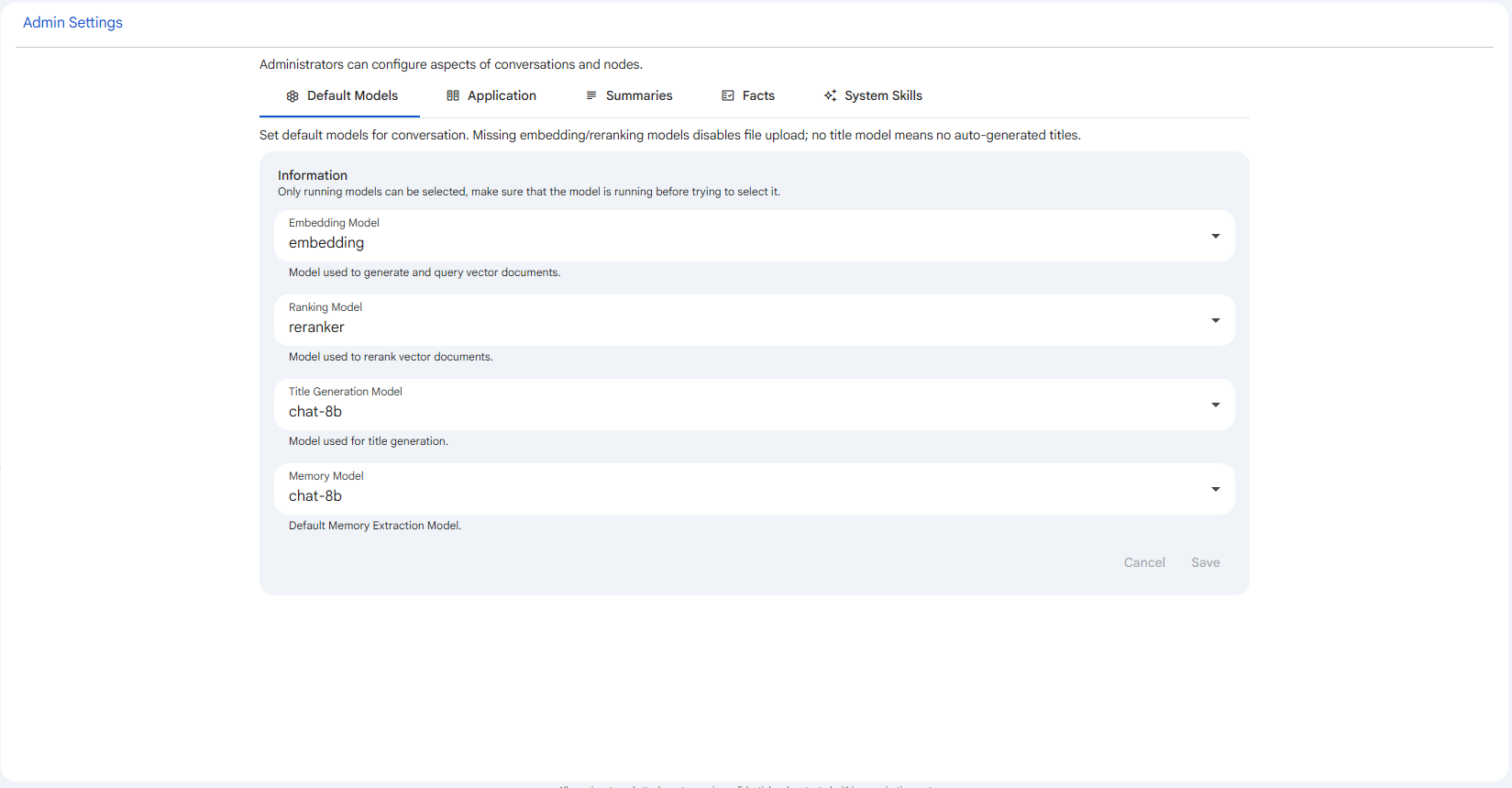 Snapshot of Protean AI Platform
This area is for administrators only. The sidebar Admin entry, the whole Admin Settings page, and each individual tab are permission-gated: a tab appears only when the signed in user holds the permission that backs it. Members without those rights never see Administration or its tabs. The active tab is reflected in the URL through a tab query parameter, so a specific section can be linked to or reopened directly.
Admin Settings presents its sections as tabs, shown in this order: Default Models, Application, Summaries, Facts, System Skills. Each tab is described below, and most have a dedicated page in this section.
Default Models
The Default Models tab sets the platform default models that conversations use out of the box: an embedding model, a ranking (reranker) model, a title generation model, and a memory extraction model. These are the fallbacks the platform applies when a conversation does not name its own model for a given task, so they shape file upload, retrieval, title generation, and memory across the whole organization. Choosing sensible defaults here matters because some are load-bearing: without an embedding and ranking model, file upload in conversations is disabled, and without a title generation model conversations do not get auto-generated titles.
Application
The Application tab holds application-level settings that apply across the deployment rather than to any single conversation or agent. It is gated by the CREATE_APP permission, so it appears only for administrators who can maintain application configuration. It is used to keep deployment-wide options consistent in one place, which matters because these settings frame the environment that every other feature runs inside. This tab does not have its own page in this section.
Summaries
The Summaries tab selects the single default summary generation setting for the platform. It is a single-select picker (capped at one selection) where you search the available summary settings, choose one, and Save. This setting matters because it is the summary configuration agents use by default to condense long conversations into a concise summary that preserves the context needed to continue. The summary settings themselves are authored and maintained in the Memory feature; this tab only chooses which one is the platform default.
Facts
The Facts tab selects the default fact extraction settings for the platform. Unlike Summaries it is a multi-select picker, because an agent can run several extractors in parallel, each targeting a different memory type and set of categories. These defaults matter because they decide which kinds of durable facts (behavior, events, profile, skills) the platform extracts from conversations by default. As with summaries, the underlying fact settings are managed in the Memory feature; this tab only chooses which ones are the platform defaults.
System Skills
The System Skills tab lists the platform-managed, read-only skills that ship with Protean and are available to every agent. They are provisioned by Protean rather than authored by users, so there is nothing to create or edit here; the tab is a catalog of the baseline capabilities (each shown with a Tools count) that any agent can draw on out of the box. This matters because it keeps a consistent, always-available set of skills across the whole organization.
Default Models
The Default Models tab sets the platform default models used by conversations. These defaults are the fallback the platform applies when a conversation does not name its own model for a given task, so picking sensible defaults here shapes file upload, retrieval, title generation, and memory across the whole organization. The tab is gated by the MAINTAINDEFAULTMODELS permission and is the section Admin Settings opens on by default.
Default Summary
The Summaries tab selects the default summary generation setting for the platform. A summary setting describes how prior conversation history is condensed into a concise summary that preserves the information needed to continue, and this tab chooses the single one that acts as the organization-wide default. It is gated by the UPDATEMEMORYSETTING permission.
Default Facts
The Facts tab selects the default fact extraction settings for the platform. A fact extraction setting describes how durable facts are distilled out of conversations, each targeting a particular memory type and a set of categories. This tab chooses which of those settings act as the organization-wide defaults. It is gated by the UPDATEMEMORYSETTING permission.
System Skills
The System Skills tab lists the platform-managed skills that come pre-configured with Protean. A system skill bundles a prompt together with one or more tools that an agent can call, and these particular skills are provisioned by Protean rather than authored by users. They are read-only and available to every agent, so the tab is a catalog of the baseline capabilities each agent can draw on out of the box. It is gated by the UPDATE_SKILL permission.